Blog > September 2026 > Microsoft 365 Government Room Booking: Secure Integration with Door Tablet Open
September 16, 2026 5 min read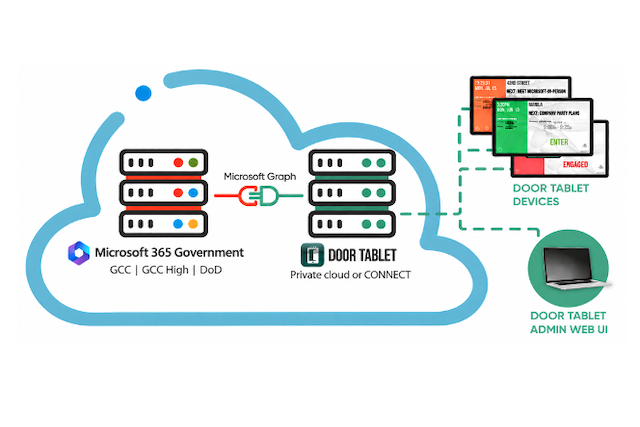
When your work involves national security, every email, calendar invite, and shared file carries a higher level of responsibility.
Government agencies, the U.S. Department of Defense, and the contractors who support them in defence, aerospace and intelligence operate under some of the strictest data security and compliance requirements in the world.
Sensitive designs, controlled technical data and confidential communications must be safeguarded at all times, with zero tolerance for exposure to unauthorised systems or personnel.
That’s why Microsoft offers Microsoft 365 Government, which includes GCC, GCC High, and DoD. In this article, we’ll explain what these government cloud environments are, who uses them, the compliance standards they support, the compatibility hurdles that often come with them, and how Door Tablet delivers a secure way to manage meeting rooms across all of these environments, whether deployed on-premises or in the cloud.
What Are Microsoft 365 GCC, GCC High and DoD and Who Are They For?
Microsoft 365 GCC (Government Community Cloud), GCC High, and Microsoft 365 DoD are specialised, highly secure Microsoft government cloud environments designed for organisations handling sensitive U.S. government and defence information.
Microsoft 365 GCC is designed for U.S. federal civilian agencies, state and local governments, tribal entities, and federal contractors who need to comply with government standards such as FedRAMP Moderate and CJIS without requiring the sovereign isolation of defense-tier clouds.
Microsoft 365 GCC High is intended for eligible U.S. government organisations and non-government entities such as Department of Defense contractors, aerospace and defence companies, intelligence community partners, and organisations handling Controlled Unclassified Information (CUI) or export-controlled data under ITAR (International Traffic in Arms Regulations).
Microsoft 365 DoD goes a step further. It is a highly restricted sovereign environment designed specifically for the U.S. Department of Defense and is available exclusively to eligible DoD entities, supporting workloads requiring compliance with the DoD Cloud Computing Security Requirements Guide up to Impact Level 5 (IL5).
For example, a municipal agency or state department might operate within GCC, a defence manufacturer or federal systems integrator handling CUI might use GCC High, while a U.S. Department of Defense service branch with IL5 requirements would operate inside Microsoft 365 DoD.
Unlike standard commercial Microsoft 365, all three environments provide data residency guarantees where customer content is stored at rest within the United States. For GCC High and DoD, Microsoft goes further into sovereign cloud isolation, where infrastructure is physically and logically segregated and backend access is strictly restricted to screened U.S. persons.
Why Do GCC, GCC High, and DoD Exist? (Compliance Matters)
For agencies, municipalities, and defense contractors handling public data, Controlled Unclassified Information, export-controlled data, or sensitive military communications, standard commercial cloud environments may not satisfy mandatory compliance frameworks.
Each tier addresses distinct regulatory thresholds:
-
FedRAMP Baselines: Microsoft 365 GCC meets FedRAMP Moderate, which satisfies requirements for the majority of civilian, state, and local government workloads. GCC High and DoD are assessed against NIST SP 800-53 controls at FedRAMP High (FIPS 199 High categorisation), providing a baseline tailored for high-impact federal and defense information.
-
DoD SRG Impact Levels: GCC supports DoD SRG Impact Level 2 (IL2). GCC High supports requirements up to DoD Impact Level 4 (IL4) (and select IL5 equivalents for Defense Industrial Base contractors). Microsoft 365 DoD provides the highest level of controls, purpose-built for DoD SRG Impact Level 5 (IL5).
-
DFARS 252.204-7012 / NIST SP 800-171: Defense contractors handling CUI must implement appropriate safeguards. While GCC covers certain baseline contractor requirements, GCC High is the industry-standard environment configured to satisfy full DFARS 7012 flow-down requirements, forensic reporting obligations, and NIST SP 800-171 controls.
-
ITAR and EAR: Export-controlled technical data under ITAR and EAR demands that data residency and access remain exclusively in the hands of vetted U.S. persons. Standard GCC does not support ITAR; GCC High and DoD were specifically built to satisfy these export-control standards.
-
CMMC (Cybersecurity Maturity Model Certification): For organizations across the Defense Industrial Base, GCC can support baseline requirements (such as Level 1 and select non-CUI scenarios), while GCC High is typically required for organizations seeking CMMC Level 2 certification where CUI and export-controlled data are present.
Together, GCC, GCC High, and DoD enable Microsoft 365 services, such as Exchange Online, Teams, SharePoint, and OneDrive, to operate safely within certified parameters matching each agency's or contractor's regulatory obligations.
Life in GCC, GCC High, and DoD: Common Tech Challenges
Operating in any Microsoft Government cloud provides essential security, but it also introduces practical administrative and architectural challenges. Because these environments prioritize isolation and compliance, not every third-party application or commercial feature works out of the box.
Microsoft services, features, and API updates often roll out to government tiers later than they do to the commercial cloud, and some consumer-facing features are disabled entirely to maintain security baselines.
For third-party software, an even bigger barrier is connectivity and endpoint architecture. While GCC shares aspects of the commercial directory infrastructure, GCC High and DoD operate on dedicated Microsoft Government cloud endpoints and separate Microsoft Entra ID (formerly Azure AD) identity instances. Third-party tools that are hardcoded solely for commercial Microsoft 365 endpoints will inevitably fail to authenticate or access calendar data when introduced to government tenants.
How Do Microsoft 365 Government Environments Integrate with Workspace Tools?
In a modern office, touchscreens mounted outside conference rooms display meeting availability, host names, and let staff book space on the fly. However, off-the-shelf room booking displays frequently rely on commercial cloud relays or third-party servers that cache calendar data, a practice that can violate government security frameworks or trigger connection errors due to unsupported government endpoints.
In GCC, GCC High, and DoD environments, workspace scheduling must respect government security boundaries:
- Meeting subject lines, attendee lists, and schedules must remain within the approved Microsoft 365 government tenancy.
- Room scheduling systems must authenticate directly against the correct cloud instance, whether connecting via standard Microsoft Graph endpoints for GCC, or dedicated sovereign endpoints for GCC High and DoD.
- Solutions that mandate sending calendar payloads through unvetted third-party cloud bridges are often disqualified during security and accreditation reviews.
How Door Tablet Bridges the Gap for Secure Room Booking
Door Tablet is a comprehensive meeting room and workspace scheduling solution that synchronises directly with your calendars to display schedules on touchscreen panels and interactive kiosks, designed with high-security environments in mind.
Door Tablet supports direct integration across Microsoft 365 GCC, GCC High, and DoD, allowing government agencies, defense contractors, and military facilities to connect securely to their Exchange Online calendars using the appropriate government cloud endpoints:
- No Unnecessary Third-Party Relays: Door Tablet communicates directly with your Microsoft 365 government tenant. Your sensitive meeting metadata never leaves your approved boundary to sit on an unaccredited vendor database.
- Support for Specific Endpoints: Door Tablet natively supports the specialized network and authentication services required by GCC, GCC High, and DoD.
- Modern Office Experience: Staff enjoy modern conveniences, checking room availability, booking ad-hoc meetings, and checking into rooms via digital signage, without compromising organizational compliance.
Flexible Deployment to Meet Your Security Needs
Every government agency, defence organisation or contractor has a unique IT setup and security posture. Recognising this, Door Tablet offers flexible deployment options to fit different requirements, whether you want everything in-house or prefer a cloud-hosted environment. Specifically, you can deploy Door Tablet in three ways:
-
Door Tablet CONNECT (Cloud Service): A shared, managed cloud server hosted by Door Tablet on AWS. While suitable for municipal or commercial deployments with less restrictive policies, organisations with strict GCC High or DoD compliance mandates often determine that a multi-tenant cloud is outside their accreditation boundaries.
-
On-Premises Server: For complete data sovereignty, you can deploy the Door Tablet server entirely within your own self-managed, on-premises infrastructure. All room configurations and calendar caches remain strictly within your local network, communicating securely outbound to your Microsoft 365 GCC, GCC High, or DoD tenant.
-
Private Cloud Instance: You can run a dedicated Door Tablet server within your organisation’s own controlled cloud tenant, such as Azure Government or AWS GovCloud. This delivers the convenience of cloud hosting while preserving dedicated single-tenant isolation for straightforward compliance assessment.
Conclusion
Navigating public sector and defense compliance is demanding, but Microsoft 365 GCC, GCC High, and DoD allow organisations of all tiers to adopt cloud collaboration without surrendering the security controls their missions require.
- GCC delivers a compliant baseline for federal civilian, state, and local agencies.
- GCC High protects Controlled Unclassified Information (CUI) and export-controlled data for defense contractors and government entities.
- DoD provides a dedicated, hardened environment for the U.S. Department of Defense supporting up to Impact Level 5.
Door Tablet’s native compatibility across all three tiers extends this protection directly to the walls outside your conference rooms. By interfacing natively with your designated Microsoft government cloud and offering true on-premises or private-cloud hosting, Door Tablet ensures your workplace management stays efficient, modern, and fully compliant.
Key Takeaways:
- Microsoft 365 GCC meets FedRAMP Moderate and CJIS standards for federal civilian, state, and local government bodies.
- Microsoft 365 GCC High provides FedRAMP High and ITAR-compliant sovereignty for defense contractors and organizations handling CUI.
- Microsoft 365 DoD is exclusively reserved for Department of Defense entities requiring DoD SRG Impact Level 5 controls.
- Room booking solutions must support specific Microsoft government authentication endpoints to function in these environments.
- Door Tablet integrates natively with GCC, GCC High, and DoD, offering on-premises and private cloud deployments that keep meeting data strictly within your accredited boundary.
We offer complete technical documentation on integrating Microsoft 365 GCC, GCC High, and DoD with Door Tablet. Create an account to access deployment guides and schedule a demo with our technical team.
Blog > May 2026 > Secure Workspace Management for High-Security Facilities Open
May 13, 2026 2 min read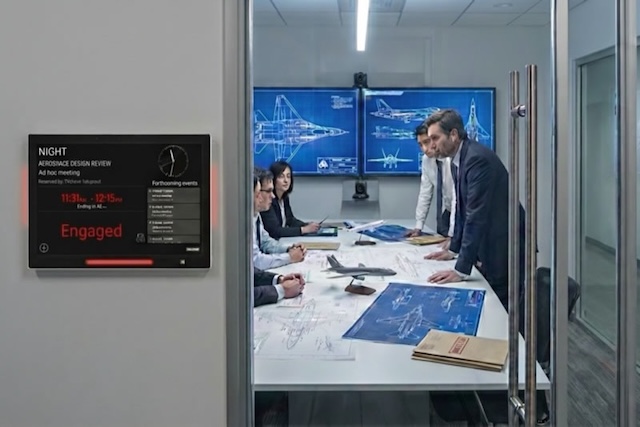
High-security environments, such as defence contractors and government agencies, require specialised infrastructure to manage sensitive data and maintain operational integrity. Standard office management tools often lack the necessary safeguards to prevent data leakage or unauthorised access in these regulated spaces.
Door Tablet provides a purpose-built workspace management solution designed to meet the rigorous demands of facilities handling Controlled Unclassified Information (CUI) and other classified data.
Our entire system can be customised for high-security environments, transforming standard office tools into hardened assets that meet rigorous defence and government standards.
Hardware Hardening and Physical Integrity
Organisations handling sensitive data must ensure that their meeting room tablets do not become entry points for unauthorised access or data leakage. Door Tablet’s meeting room tablets can be equipped with specialised hardware configurations and utilize a dedicated Hardened Operating System.
Security features of our meeting room tablets:
- Port and Sensor Lockdown: The Hardened OS can be configured to permanently disable USB and micro-USB ports, cameras, microphones, and Bluetooth, ensuring no unauthorised data extraction or eavesdropping can occur.
- Tamper-Resistant Infrastructure: Unlike consumer tablets, Door Tablet devices are purpose-built for the office. They feature secure wall mounts and a durable design that lacks the resale appeal of a standard iPad, reducing the risk of theft.
- Zero Local Credentials: No sensitive data (e.g., usernames, passwords, or meeting credentials) is ever stored on the tablets themselves. All information resides solely on the central server, so a compromised device yields no usable intelligence.
- Access Control Integration: Using built-in RFID and NFC readers, Door Tablet integrates with existing facility security systems. Users must swipe their security access cards to check into a room or extend a session, ensuring that only cleared personnel can interact with the room's scheduling or physically unlock the door.
- Physical Wireless Exclusion: The Door Tablet SL-Cyber is built specifically for organizations where wireless signals represent a security risk. This model has Wi-Fi and Bluetooth hardware physically removed from the board to provide total signal isolation.
Software Sovereignty and Deployment
The architecture of a management solution determines whether it can meet federal and defence-grade compliance.
We integrate with many scheduling systems, including high-security systems and offer 3 deployment options:
- Microsoft 365 GCC High Integration: For organisations in North America in the defence industrial base, Door Tablet provides a native integration for GCC High resource calendars. Both systems communicate directly via the Microsoft Graph API, ensuring data stays within the authorised U.S.-only cloud boundary and supporting ITAR, DFARS, and FedRAMP High compliance.
- On-Premises Deployment: For air-gapped facilities, Door Tablet can run entirely on your own internal servers behind a firewall. In this model, the system is invisible to the external internet, providing maximum control over data residency.
- Private Cloud Options: Organisations can host their Door Tablet server within a dedicated single-tenant instance on Azure Government or AWS GovCloud. This offers the scalability of the cloud while maintaining the isolation required for regulated data.
Door Tablet provides a secure workspace management solution for high-security facilities, enabling them to streamline their room booking workflows while ensuring that sensitive information remains within the organisation.
Get Access with our team to see how Door Tablet can provide an easy, secure meeting room booking experience.
Blog > March 2026 > 5 Security Questions to Ask Before You Buy Workplace Management Tech Open
March 18, 2026 4 min read
Workplace leaders are investing heavily in new tools to make office work attractive to their teams, like desk booking, wayfinding, room booking displays, and sensors. But while everyone else is focused on “experience,” IT is focused on something far more urgent: security.
Because at the end of the day, it doesn’t matter how sleek a workplace device looks if it quietly increases your attack surface.
Before signing a contract for any workplace management solution, consider five key security questions that should guide the conversation. They’re the kinds of questions that help IT protect employees, protect data, and protect the organisation’s network long after launch day.
We’ve broken them down for you so you can walk into your next demo call prepared.
1. How is user and device authentication handled, and what prevents unauthorised access?
Any device you place in your office, especially one mounted publicly, like a room-booking display or a hot-desk kiosk, is an entry point.
Your leadership team doesn’t need a full technical breakdown, but they do need to understand how the solution enforces trust at the front door.
Ask:
- Does it support badges, SSO, MFA, or role-based access?
- Does the device itself require a secure login, or is it open once powered on?
- Can it be quarantined when first added to the network?
Weak authentication can allow someone to reserve rooms they shouldn’t, access internal systems, or use the device as a stepping stone into your network.
2. What data is collected, how is it stored and transmitted, and how is it protected?
Workplace management tech collects personal activity data: bookings, check-ins, usage patterns, and occupancy trends.
This is where you need clarity for yourself and something concrete to present to leadership.
Ask:
- Is data encrypted in transit (TLS/VPN) and at rest?
- Where is data stored (cloud region, on-prem, third-party)?
- Who has access to the database?
- How are permissions managed?
Employee location and time-based data are sensitive under GDPR and internal privacy policies.
3. How does the system integrate with your existing networks and IoT devices, and what risks come with that?
The workplace management tools connect to sensors, calendars, mobile apps, visitor systems, analytics platforms, and more. This is the perk of every workplace management tool: they integrate with your day-to-day apps.
Ask:
- Will devices sit on your main corporate network or a segmented VLAN?
- How are displays, sensors, and mobile apps authenticated?
- Are API connections encrypted and access-controlled?
- Are IoT components updated and monitored?
A single poorly secured IoT device can expose your entire network. Integration should enhance the workplace and not expand your attack surface.
4. What physical-security features are built into the hardware (for instance, tamper-resistant casing, secure boot, a hardware root of trust)?
A room display mounted in a hallway or a hot-desk kiosk on an open floor isn’t sitting safely behind a desk; it's exposed. That means the hardware itself needs to defend against tampering, unauthorised access, and manipulation.
Ask:
- Is the casing tamper-resistant or easy to open?
- Does the device use secure boot to prevent unauthorised firmware?
- Is there a hardware root of trust to validate system integrity?
- What happens if someone attempts to force access, reboot, or remove the device?
- Can IT be alerted if a unit is disconnected or physically disturbed?
Door Tablet offers a purpose-built hardware line which includes security-hardened hardware. Our SL Cyber edition disables WiFi and Bluetooth at the board level, locks down USB ports, developer options, camera/mic access, and limits installations to certified versions only.
5. What is the vendor’s plan for updates, incident response, and long-term maintenance?
The vendor needs to treat patching and monitoring as critical, ongoing responsibilities.
Ask:
- How often are firmware or software updates released?
- Are patches automatic or manual?
- Is there logging for device health, anomalies, or attempted breaches?
- What is the incident-response plan if something goes wrong?
Unpatched devices become liabilities. One outdated display can disrupt operations or expose sensitive data.
You are ready!
These five questions give you a clear, practical way to evaluate any workplace-management platform and ensure the tech you choose strengthens your organisation rather than weakening it. Use these questions next time you are looking for workplace management tech, and while you are at it, check Door Tablet’s secured workspace management ecosystem.
Blog > January 2026 > RFID for Meeting Room Access Open
January 21, 2026 3 min read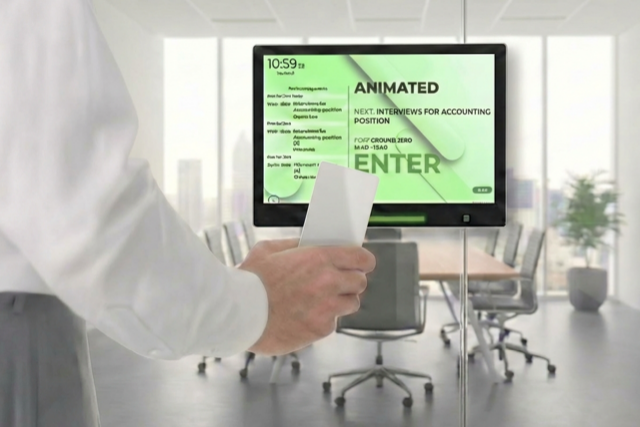
At a Glance
When integrated into meeting room displays, RFID lets you tie access permissions directly to bookings. With solutions like Door Tablet, users can tap their badge to check in, extend, or end meetings, but only if they’re authorised. That means no more anonymous use or walk-up takeovers. You can control who does what at the door, enforce booking policies, disable lost credentials remotely, and meet higher security standards with hardened device options.
Most people don’t give a second thought to tapping a badge on a meeting room tablet. For IT and facilities teams, however, that “tap-and-go” moment solves a long-standing headache like unauthorised use.
This article explores how RFID works in practice and how it can transform meeting room access for corporate HQs and government institutions.
What Access with RFID Looks Like
When employees walk up to a booked meeting room and tap their badge to unlock the door or check in, there’s usually one of two technologies at work behind the scenes.
RFID (Radio Frequency Identification) uses radio waves to allow passive ID cards or key fobs to transmit a unique identifier when held near a reader. It’s fast, contactless, and widely used in access control systems across offices worldwide.
A related technology is NFC (Near Field Communication), which is essentially a subset of RFID designed for very short-range interactions (a few centimetres) and often used with mobile devices.
Both RFID and NFC can enable secure, contactless access. However, in this article, we’ll focus on RFID and its use in room-booking panels, hot-desk kiosks and broader access control.
This technology helps automate the process of verifying that the person at the panel is allowed to be in that room at that time. There is more to it when it comes to meeting room panels; RFID can link people to bookings and actions.
RFID for Meeting Room Panels
One of the big advantages of using RFID on meeting room panels is the ability to control who can do what. For example:
- Reserve a meeting space – Presenting an NFC tag reserves the room and identifies the owner
- Extend or terminate a meeting – Only the user who originally booked the room can extend or end it. This prevents strangers from hijacking or cutting off someone else’s meeting.
- Check in to a pre‑booked meeting – Users must tap their badge to check in; a notification goes to the meeting organiser confirming who checked in.
- Self‑register or disable tags – Users can self‑register new badges, or administrators can disable lost tags remotely.
- Request assistance – The panel can log a support request and automatically identify the requester, and when integrated with access control, can activate door opening for the authorised user.
Because the panel knows exactly who is tapping, it can enforce policies like “only the meeting host can make changes” or “unauthenticated guests cannot extend bookings.”
The booking system automatically enforces policies without manual oversight and creates a clear audit trail of room usage, which is essential in regulated industries.
This is important in corporate headquarters and government buildings, where meeting content may be confidential and access needs to be controlled. Door Tablet even supports “secure check‑in” modes and can provide a hardened version of its devices for sensitive environments.
Getting Started: What to Look For
Your meeting rooms should accommodate the credentials your organisation already uses and the ones you might adopt tomorrow.
Most of Door Tablet’s meeting‑room displays include a reader that recognises Mifare, FeliCa and HID smart cards as well as standard RFID badges. Staff can tap the same badge they use at the front door, and the panel links their identity to the booking.
The reader is built into the tablet, so there’s no separate device or wiring. For organisations that rely on HID credentials, Door Tablet offers hardened variants (AIO-h and CIR-h) where the hardware is slightly different, but all the functions (booking, check-in, extending meetings) work with HID cards.
Compatibility matters off the wall, too. A robust platform should integrate with your existing calendar and identity systems. Door Tablet ties badge IDs to user accounts, whether they’re stored on the device or in an external directory like Active Directory or a third‑party access control system.
That way, the same badge that opens the front door can also authenticate a meeting room booking, and policies such as “only the host can extend the meeting” are enforced automatically. Because the panel knows who tapped, it can send an alert if someone without permission tries to change a reservation.
Why Door Tablet Fits the Bill
If you’re weighing whether to implement RFID, Door Tablet shows how you can utilise this in your workspace management. Door Tablet displays support for multiple card technologies, making it easy to adopt contactless check‑in without replacing everyone’s badges.
The platform enforces who can do what on the display, like only the booking owner can extend or end a meeting and logs every tap for a clear record. Integrations with external identity systems mean credentials are managed centrally and can be disabled instantly. And for environments with tight compliance requirements, hardened devices provide secure check‑in and optional PIN or RFID door unlocking.