anonymous216.73.216.54
Live demo directory
Find your look.
Try it live.
Explore room booking and workspace management for yourself. Try eight interactive themes across different tablet types and sizes, and see what works for your spaces.
Logging in is required to access the demos. New here? Register for access.
For the best demo experience, use Google Chrome. Once logged in, you can also get these templates from Downloads.
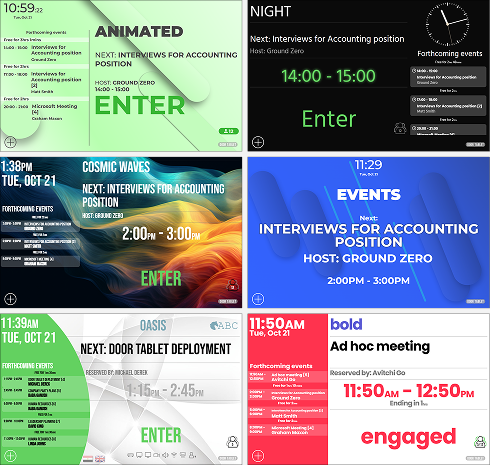
The demo collection
Eight themes.
Which one feels like you?
Start with Vanilla for the original Door Tablet experience, or explore a different look. Every theme is fully customisable.
Vanilla
The original, out-of-the-box Door Tablet theme. Clear information makes room availability easy to recognise from a distance.
Ideal for: Corporate
Night
A dark theme with an analogue clock and the room agenda displayed on the right.
Ideal for: Corporate
Events
A focused layout for events and conference venues. Use a tablet outside each room, or disable the buttons for a large screen in a public area.
Ideal for: Corporate, Education
Animated
Animated bars and lines bring movement to the display.
Ideal for: Corporate, Education
Plume
A dark background with a colour-changing plume that indicates the room's status.
Ideal for: Corporate
Oasis
A colour-neutral theme based on Metallic, with a curved design.
Ideal for: Corporate, Hospitality, Medical, Education
Bold
A colourful yet neutral theme with a distinctive look.
Ideal for: Corporate, Hospitality
Cosmic Waves
Colourful waves with white text in every room status. This demo also shows labels translated into French.
Ideal for: Corporate, Education, Hospitality
Beyond the demo
Start with a theme.
Make it your own.
These demos are starting points. All Door Tablet themes are fully customisable, with options to suit the way your organisation works.
Speak your language
Choose from 27 supported languages and offer an on-screen language switcher. More languages can be added easily using Translation Sets.
Manage meetings at the door
Enable booking from the tablet, extend or end meetings, and set a check-in deadline.
Connect your spaces
Integrate with sensors and show the number of attendees on the display.
Keep exploring
Find the right fit for your spaces.
Explore the hardware
Compare devices for your meeting rooms and workspaces.
See the bigger picture
Discover how Door Tablet supports room booking.
Talk to our team
Get help choosing a solution for your organisation.
Ready to try Door Tablet?
Register for access to the live demos and downloadable templates.
doortablet/dtcms.nsf/doortablet/dtcms.nsf::/doortablet/css/dt.css?rnd=45671" id="dt-css" data-dummy="contpagesDB052DD19BF1B68080258877003506E6Demo Directory