n
anonymousdoortablet/dthelp.nsfdesks-branding
Protected content
| 274pages | Our help system contains many pages and videos for you to consume. This includes the complete information on how Door Tablet works, all its features and options, and of course the many benefits for your business. Door Tablet School offers many videos too. |
|
Click on images to see them in full screen
B849CB86DB18DEFB80258D5B004FA3E6Branding
To brand a BOOKER or FloorPlan wayfinder displays use:
Floor plans displays
In order to colour areas in your floor plans we use a number of built-in colours to paint the areas. Since attributing CSS classes on area does not work properly, we paint these using JavaScript code. You can affect these code easily but suppling your code in the System Profile. The same technique applies to normal floor plans but also to BOOKER plans.
How to change colours for floor plans
Door Tablet uses its own colours but you can change these as you see fit, You can also choose to edit some of the colours and not all.
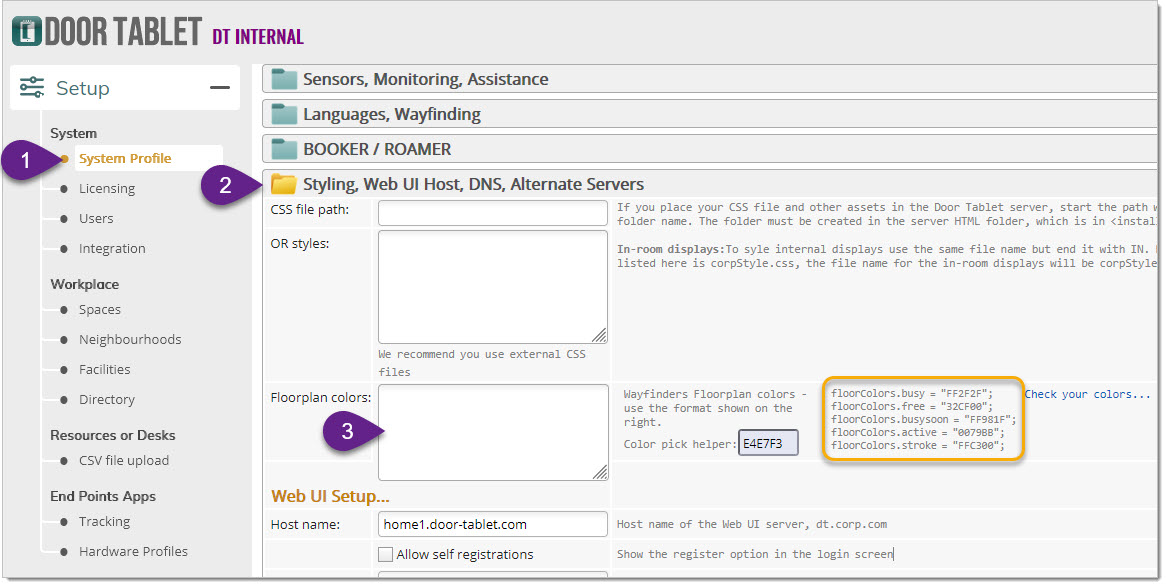
- Open the System Profile and head to Styles.../Floorplan colours,
- The code shown in the yellow box can used for initial values. Copy the lines you wish to change and paste them into the field (3). The colours are specified in HEX code which you can change. You can use the "Color pick helper" to get the HEX values of new colours or select a similar colour by pasting an existing one into the helper
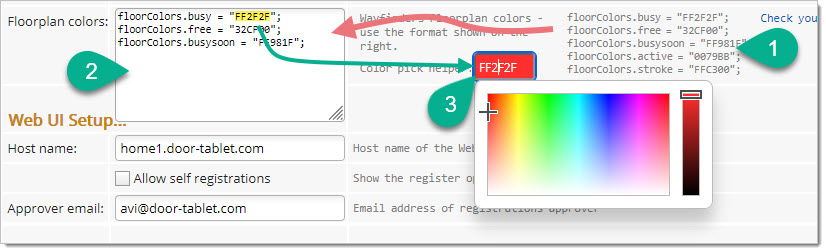
Follow these steps to install new code and amend colour values:
- Copy existing code from the existing list. As you see in the example we changing only three
- Paste it to the field in colours field. The three existing codes are now in the field
- Copy the HEX value you wish to change
- Paste the HEX to the helper and get a new HEX code
- Copy and Paste back the new HEX value into the correct code
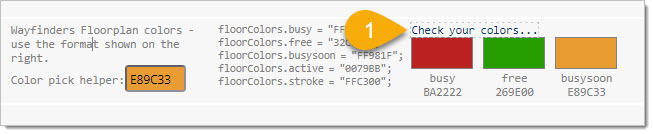
When you are done you can test the new colours by clicking on "Check your colors", like so:
Booker Floor Plans colours work in exactly the same way:
 Note:
Note: floor plans apply CSS Opacity programmatically which you cannot control. Therefore, you can increase the intensity of colours to compensate. However, this is rarely required
Changing appearance of labels
The floor plans use labels to show who booked the space, To change the appearance of these use CSS. The common class to change is "lblsDiv".
Changing the appearance of the Legend and Time Bars
For Door Tablet BOOKER you can specify the path to a CSS file in the System Profile, as showing here:

Your CSS may include selectors you can easily obtain by inspecting the BOOKER application.