There is no quicker way to kill a meeting’s momentum than a knock on the door. You are deep in a strategy session, the team is focused, and suddenly a head pops in just to ask if the room is free.
The flow is gone instantly. You have to stop, answer, and try to get everyone back on track.
We tend to blame these moments on bad timing, but they signal a deeper failure in how your office manages meeting room space. Your office might rely on printed schedules or spreadsheets, which can lead to this kind of friction.
Here are the signs that your office needs a dedicated room booking system.
Double Booking
We all trust our digital calendars to be the single source of truth. But even modern software has a blind spot that creates a specific type of chaos.
You spot an open slot on the calendar for 2:00 PM. You grab it and send the invite. You feel good because the system confirmed your request. But at that exact moment, a colleague in another department saw the same open slot and clicked the same button.
Because of the slight delay in how calendars sync across servers, the system let both of you through. You both think you have the room reserved. You both show up at the door with your laptops and your teams. Neither of you did anything wrong, but now you have an awkward standoff to resolve while the clock ticks down on your meeting time.
Ghost Meetings
A major symptom of poor room management is the inability to see what is actually happening in real time. You might feel like your office is constantly full, but the numbers often tell a different story.
According to the Wall Street Journal, the global average usage rate of meeting rooms is only 35%. This discrepancy proves that your office is not actually full. It is just inefficient.
A recurring meeting was cancelled, but it was not removed from the calendar. The room sits dark and empty, yet the schedule says "Project Alpha Sync." Meanwhile, three other teams are huddled in the kitchen because the calendar told them there was no space.
This confusion has a real cost. The same Wall Street Journal report notes that 40% of employees waste up to three weeks a year just trying to find a suitable meeting space. That is a massive amount of lost productivity caused simply because your team cannot see which rooms are actually free.
Want to learn about the ideal meeting room booking workflow? Read the article here.
Interruptions and Meeting Room Squatters
The interruption mentioned earlier happens because there is no way to know a meeting is in progress without opening the door. But the problem also works in reverse.
We have all dealt with the room squatter. This colleague sees an empty room and simply walks in to take a call. They never looked at the calendar because the door was open and the lights were off. They assume empty means available. You arrive for your scheduled meeting only to find them comfortable and spreading out, forcing you to have an awkward conversation to get them to leave.
How Door Tablet Brings Order to the Office
These issues are not caused by difficult people. They are caused by a lack of clarity. Door Tablet steps in to turn your physical office into a responsive system that actually works with your teams.
These issues are simply symptoms of an office that lacks the right tools. The solution is to link your physical rooms directly to your digital calendar. That is exactly what Door Tablet does.
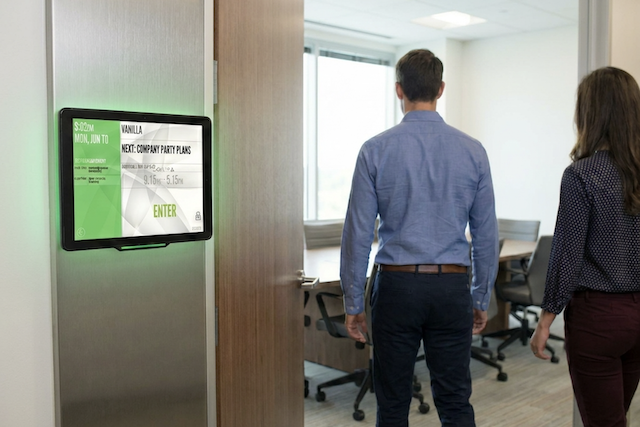
Door Tablet is a system of purpose-built touch screens that you mount on the wall right outside your meeting rooms. These screens connect directly to the calendar software you already use, like Microsoft 365 or Google Workspace.
It works by giving you immediate, visual control over the space. The tablets feature bright LED lights that act as a clear signal for the whole hallway. If the light is green, the room is free. If it is red, a meeting is in progress.
Functionally, it allows your team to interact with the room right at the door. If you need a space for a quick chat, you walk up to a green-lit room, tap "Book" on the screen, and the room is yours. The status instantly updates on everyone’s calendar so no one else tries to book it.
It also solves the "ghost meeting" problem with a check-in feature. You can require the meeting host to tap the screen to confirm they have arrived. If they do not check in within a set time, the system assumes the meeting is a no-show and automatically releases the room, turning the light back to green so others can use it.
It is a simple hardware and software upgrade that turns your office walls into active, helpful tools rather than static barriers.