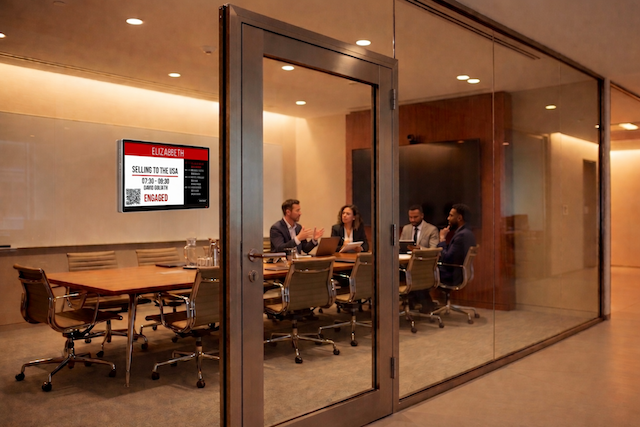
If you have landed on this article, chances are you are already eyeing Electronic Paper displays as a contender for your meeting rooms.
And it is easy to see why. The market for room booking hardware can be exhausting. You have endless options for high-end LED touchscreens, rugged industrial panels, and budget tablets. While those devices are powerful, they often feel like "overkill" for a simple huddle room or a phone booth.
You are likely looking for ePaper because you have hit a specific infrastructure wall. Maybe you have glass-fronted rooms where you can’t hide cables. Maybe you are tired of replacing swollen batteries in consumer-grade iPads. Or maybe you just want a sign that doesn't add more glowing blue light to your office and offers a more sustainable, energy-efficient option without compromising on smart functionality.
You are looking for something simpler. This is exactly what ePaper meeting room displays were built for.
It is a technology that feels distinct from the standard tablets in the market. But is it the right fit for your specific office? To answer that, you need to understand exactly what this technology does differently and where it fits best in a modern floor plan.
How Ink Went Digital
To understand why this tech is different, you have to stop thinking of it as a "screen."
Standard LED screens, such as the one on your laptop or phone, work by emitting light directly at your eyes. They require constant power to keep those pixels glowing. If you pull the plug, the screen goes black.
ePaper (Electronic Paper) works more like a physical sketchpad. The display is made up of millions of tiny microcapsules containing black and white particles. When the device needs to show a new meeting time, it sends a quick pulse of electricity through the screen. This pulse moves the particles around to form letters and numbers.
Once the particles are in place, they stay there without any power.
The screen only uses battery life when the image changes. If a room is booked from 9 AM to 12 PM, the sign sits there for three hours using zero energy. The main advantage of e-paper meeting room displays is that they can operate on batteries for months, or even up to a year, depending on how frequently the schedule updates.
Where ePaper Wins (and Where it Doesn’t)
Choosing between a standard LED tablet and an ePaper device comes down to one question: What is the room's biggest constraint?
Here is where ePaper (like the Door Tablet EPS) is the superior choice:
- The "Glass Wall" Problem: We love glass meeting rooms for their aesthetics, but they are a nightmare for wiring. You can't drill into glass, and sticky cable runners look messy. Because E-Paper devices run on batteries for months (or years), they are completely wireless. You can stick them directly onto the glass.
- The Sunlight Struggle: If you have a meeting room in a sunny atrium or near a skylight, standard screens will struggle with glare. They have to pump up brightness to compete, which kills the battery. ePaper is reflective—it uses the ambient light in the room. The brighter the sun, the sharper the text looks.
- The "Quiet" Spaces: In a phone booth or a focus room, you don't necessarily need a glowing screen asking for interaction. You just need a passive sign that says "Occupied." ePaper provides that information silently, respecting the calm nature of the space.
Where LED "Interactive" Tablets Take the Lead:
- Dark Corridors: Because ePaper reflects ambient light (just like real paper), it is hard to read in the dark. If your meeting room is in a dimly lit hallway or a corner without good overhead lighting, a backlit LED screen is the better option because it provides its own visibility.
- Complex Booking: While ePaper is great for viewing info, the refresh rate is slower than an LED screen. If you expect your teams to stand at the door and browse next week's calendar, view floor maps, or manage complex bookings right on the glass, the snappy responsiveness of a standard LED tablet (like the Door Tablet NXT ) offers a smoother experience.
Read our article about Interactive vs Non-Interactive Meeting Room Displays.
The Hybrid Approach: Mixing Your Hardware
The best room booking deployments don't force one type of hardware on the entire building. They mix and match based on the need.
- For the Boardroom: Use a robust LED Touchscreen (like the Door Tablet SL). You have power there anyway, and you need the high-resolution interactivity for client presentations and instant booking.
- For the Huddle Rooms & Phone Booths: Use the Door Tablet EPS. Keep the installation wireless, clean, and simple.
The Door Tablet EPS
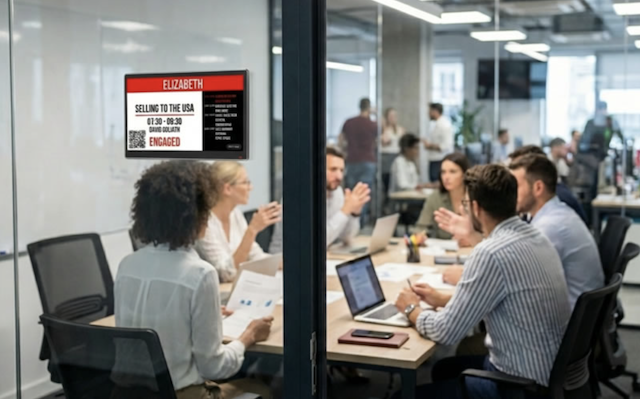
Door Tablet EPS connects to your central scheduling system just like our high-end touchscreens, ensuring your data is always accurate. But it offers a slim profile, incredible battery life, and the ability to turn any wall (glass, brick, or stone) into a smart space.
It allows you to stop worrying about wiring and start focusing on how your office actually flows.
Ask us anything about our Door Tablet EPS here.