Key Takeaways
- Calculate desk ratios using total weekly in-office days divided by five, while maintaining mandatory buffers for peak attendance and visitors.
- Enforce a consistent, rotating attendance schedule across departments to flatten the occupancy curve and prevent mid-week capacity failures.
- Implement Door Tablet hardware and software to manage desk and meeting room availability, prevent double bookings, and track usage data.
Managing a hybrid office requires a structured booking system that guarantees every arriving employee a workspace. This article explains how to balance desk ratios, manage meeting room availability, and use workplace management platforms like Door Tablet to create a predictable environment for your staff.
How do I calculate the correct desk-to-employee ratio for a hybrid office?
Calculate the correct desk ratio by multiplying the total headcount by the required weekly in-office days, then dividing that figure by 5. For 10 employees working 3 days a week, the office must cover 30 in-office days, making 6 desks the minimum requirement.
One desk handles 5 in-office days per standard working week. Dividing the 30 total in-office days by 5 yields the 6-desk baseline. Maintaining this minimum capacity requires a perfectly distributed schedule where exactly 6 employees attend the office each day. Mandating an anchor day where all 10 staff members attend simultaneously overrides this calculation and requires a 1:1 ratio of 10 desks. Operating at the minimum desk count also dictates adding a separate allocation of bookable hot desks to handle visitors and daily exceptions.
CBRE data shows that companies shifting to a hybrid model save 10% to 50% in space costs by accurately applying these calculations to reduce their real estate footprints.
Why is a consistent hybrid schedule necessary to prevent office chaos?
A consistent schedule prevents capacity failures by making office occupancy predictable. Allowing staff to choose their own days results in empty offices on Mondays and severe desk shortages on Thursdays.
- Assign specific in-office days to departments to flatten the occupancy curve across the week.
- Rotate these assigned days every 3 months to maintain fairness regarding Friday remote work.
- Treat capacity failures as a system routing issue, not an employee compliance problem.
Strategies for a Functional Hybrid Office: HR, IT, and Facilities
A functional hybrid office requires human resources, IT, and facilities teams to coordinate booking system policies.
- Human Resources: Manage the hot desking transition through direct communication and mandatory system training.
- Information Technology: Deploy desk booking software that supports real-time availability checking and workspace preference selection. Verify the office maintains fast Wi-Fi and strict data security protocols for the booking platform.
- Facilities Management: Plan office layouts for maximum efficiency. Provide sufficient desks, direct power sources, and ergonomic furniture to support daily tasks.
How should I categorise desks to maximise utility for different teams?
Categorise desks effectively by dividing the floor plan into distinct functional zones based on task types. Group collaborative desks near meeting rooms to contain noise, and position quiet zones in low-traffic areas for deep work.
- The Cisco Global Hybrid Work Study 2022 reveals that 76.8% of employees view technology as a top 3 driver for transitioning to flexible work.
- Use Door Tablet to restrict specific desk clusters to designated departments.
- This configuration guarantees teams can find adjacent seating without competing with other departments.
Why should I use data to adjust my desk booking strategy every quarter?
Use booking data to identify structural failures in your desk allocation before they cause critical workspace shortages. Historical system logs show exactly which days consistently exceed safe occupancy limits. If reports indicate 30 in-office days are required for a team, but everyone attempts to visit on Wednesday, the current ratio will fail. Review these analytics regularly to shuffle assigned days every 3 months and maintain operational flow.
Are you looking to implement Hot Desking in your Hybrid Office? Read this article to learn how to implement hot desking successfully
How do I manage desk bookings for office visitors and contractors?
Manage external guests by designating a fixed percentage of total desks exclusively for visitors to protect the permanent staff allocation. Mark these exception desks clearly within the booking interface to prevent daily users from occupying them. Door Tablet allows guests to book temporary spaces without needing full system credentials, keeping the floor plan organised and ensuring visitors have a professional workspace.
Top-rated workplace management solution for booking desks and meeting rooms
A top-rated platform integrates hardware sensors and software to provide a live, accurate view of office availability. Door Tablet operates as a unified workplace management tool that has both hot desking and meeting room scheduling.
- Independent Desk Scheduling: The hot desking system operates entirely within the web interface and does not require representation in Microsoft 365, Exchange, or Google Workspace.
- Flexible Desk Booking: Staff can book spaces for the morning, afternoon, or full day across multiple time zones, receiving automated email confirmations for all actions.
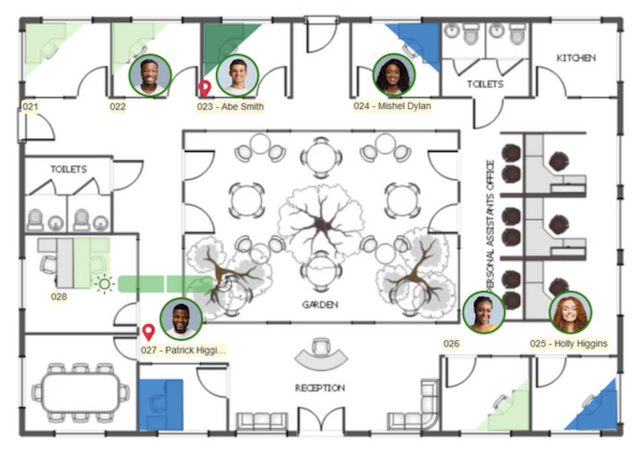
- Visual Floor Plans: Users navigate allowed areas, view team locations, and see user avatars on interactive floor plans and time bars.
- Occupancy Controls: Administrators configure dedicated desks, block specific seats, set who can book for others, and enforce strict occupancy levels to prevent overcrowding.
- System Administration: Managers can import desk inventories via CSV files, integrate ID management using SAML, use a simple floor plan editor, and modify the interface branding.
- Automated Room Management: The software eliminates ghost meetings by automatically cancelling reservations and freeing resources following a no-show.
- Hardware Integration: Professional displays feature LED status indicators for instant visual availability and utilise RFID and motion sensors for physical check-ins.
- Native Synchronisation: Meeting room bookings integrate directly with scheduling systems like Microsoft 365 and Google Workspace to prevent double bookings.
- Usage Analytics: The system generates detailed reports on facility utilisation at a granular level, providing the data required to adjust desk ratios.
Book a demo with Door Tablet to see both meeting room and desk booking solutions in action for your hybrid office.
Our Conclusion
A functional hybrid office relies on calculated capacity ratios and enforced schedules rather than employee preferences. You must align your physical space with actual attendance data to prevent mid-week capacity failures. Door Tablet supplies the hardware and software necessary to track live occupancy and manage daily desk allocations. Stop estimating your required desk count and start using accurate usage metrics to justify your real estate decisions.
Frequently Asked Questions
How can I reserve meeting rooms efficiently in a hybrid work environment?
Reserve rooms efficiently by using a unified platform that synchronises availability across all user devices in real-time. Door Tablet integrates meeting room booking software directly with physical office hardware to execute reservations and prevent scheduling conflicts.
How do I ensure fairness in desk availability?
Ensure fairness by rotating popular in-office days among different departments every quarter. This scheduled rotation prevents specific teams from permanently losing access to desks on peak mid-week days.
What happens if our office is consistently too crowded?
If the office is over-capacity, you must either lower the daily booking cap or revert to an anchor day model with a 1:1 desk ratio. Door Tablet provides the occupancy data needed to implement these structural policy changes.
What are the essential features of a modern desk booking system?
Essential features include real-time availability tracking, hardware integration, and workspace preference filters. A modern system must prevent scheduling conflicts and provide occupancy data for facilities planning. Door Tablet delivers these features by combining physical room displays with a central administrative platform.
Where can I find software that integrates desk booking and meeting room scheduling?
You can find integrated software through dedicated workplace management providers. Door Tablet offers a single solution that combines both desk booking and meeting room scheduling. This integration allows users to manage all physical office assets through a single interface.