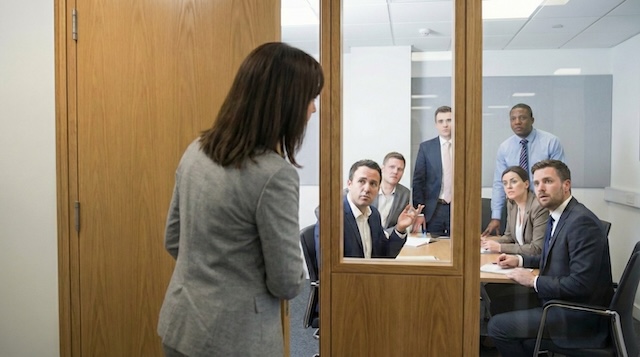
Has it ever happened to you? You’re in the middle of a meeting when someone knocks, cracks the door open, and asks, ‘How long will you be here?’ Or worse—‘I booked this room in Outlook, not you. A true corporate horror movie.”
A “quick knock” might seem harmless, but research shows it’s anything but quick. Research into digital interruptions shows that once our focus is broken, it can take over 11–16 minutes to resolve the interruption and re‑immerse ourselves in the task, and some workplace studies report averages closer to 23 minutes. These constant interruptions are linked to increases in stress and perceived mental overload. In other words, every quick knock costs far more than a polite moment of door‑side etiquette; it erodes productivity and makes in‑office collaboration feel frustrating rather than energising. No one likes to be interrupted in the middle of a meeting.
Why the knocks keep happening: poor visibility and outdated booking data
Before we blame the folks doing the knocking, let’s recognise the real culprit: a broken office user experience. These interruptions aren’t happening because colleagues are inherently rude or territorial – they happen because our workplace tools and setups are failing us. Double-booked rooms, missing calendar updates, and unclear room status create an environment where even well-meaning employees end up in turf wars over meeting space. The issue isn’t people; it’s poor visibility and outdated information. In other words, it’s a design and tech problem in the office itself.
Think about why someone might crack that door open in the first place. Often, it’s because they aren’t sure if the room is truly free or how long it’s booked until. Perhaps your team extended a meeting last minute, but the calendar still shows it ending at 2:00. Or maybe their team reserved the room in another system that didn’t sync, so both parties think they have a claim. In many offices, there’s no door-side status indicator to signal “occupied” or “available,” so people resort to peek-ins and knocks.
These issues have measurable impacts. A workplace survey found that nearly half (48 %) of office workers waste time each week searching for a free meeting room, and those who lose time report wasting about 30 minutes per day.
Sensor data collected across one million square feet of office space revealed that 30% of conference‑room bookings were “ghost meetings” where no one showed up. With so much wasted time and mistrust in booking data, it’s no wonder that people resort to knocking on doors; it’s the only way to be sure.
The workplace hasn’t been equipped with the right tools to make room booking transparent and reliable. An employee should not have to play detective to find a meeting space, nor feel like they need to challenge others (“I booked this room, not you” Ouch!), just to claim what they need.
If the interface of the office – from calendars to conference room doors – doesn’t clearly show who’s where and when, people will inevitably step on each other’s toes. The good news? Fix the interface, and you fix the problem.
What modern room displays fix
So how do we prevent these awkward interruptions and scheduling showdowns?
Our answer is room display tablets – the little screen that could be mounted right beside the door.
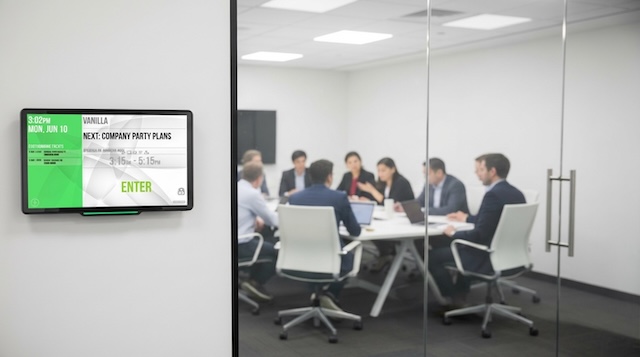
They tackle the root causes of interruptions by making meeting info visible and up-to-date at all times. In essence, they turn an office UX nightmare into a smooth, dare we say enjoyable, experience.
So what exactly can modern room displays do? Quite a lot. And you can see all of it in action with Door Tablet’s room-booking displays, which bring these features to life:
- Real‑time calendar sync with Microsoft Exchange, Google Workspace or other systems, eliminating ghost meetings. If a meeting is cancelled or a room is booked at the last minute, the display updates immediately.
- LED status bars that glow green when a room is free and red when it’s occupied. Colleagues can see down the hallway whether a room is available without walking over or interrupting a meeting.
- At‑the‑door information showing the current meeting, organiser, and how long until the room is free. Users can scroll to see upcoming reservations or confirm that they have the right room.
- Check in with auto‑release. When attendees tap to confirm they’ve arrived, the system keeps the reservation. If nobody checks in, the room is automatically released back to the pool, reducing empty‑but‑booked spaces.
- Tap‑to‑book for ad‑hoc meetings. You can book the meeting room right in front of you or any nearby free room using the tablet. Just tap the display to reserve it instantly without opening your laptop.
These features remove the ambiguity that causes quick knocks. People trust the information displayed, so they stop interrupting colleagues and start using rooms efficiently.
The Payoff: Peaceful Meetings and Productive Collaboration
In the end, the equation is pretty straightforward. The knock on the door is replaced by a quick glance at a screen. Fewer interruptions mean more focus and flow during meetings.
The knock on the door is replaced by a quick glance at a screen. The stress of losing your train of thought is replaced by confidence that your meeting won’t be disturbed. It’s a small change in infrastructure with an outsized impact on day-to-day productivity. With this simple upgrade, your company can finally close the door on constant meeting interruptions – for good. Fewer knocks, more getting stuff done. Now that’s a happy ending for everyone in the office.
Done with mid-meeting interruptions? Get a quick demo and see how Door Tablet ends the “quick knock” for good.