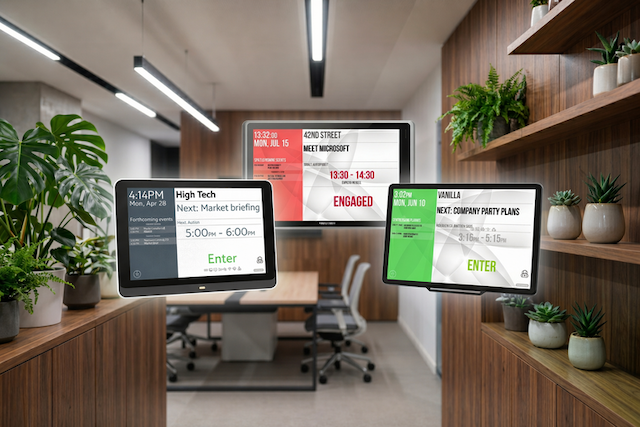
We will walk you through exactly how to choose the right conference room schedule displays for your corporate office. Rather than throwing technical specifications at you, we are going to look at how different displays solve specific workplace behaviour problems. By the end of this guide, you will know exactly which Door Tablet hardware fits the unique rhythm of your office.
Key Takeaways
- Match specific display hardware to the physical requirements of your workspace. Use e-ink displays for glass-fronted rooms to manage glare, select non-touch units for signage in busy corridors or training rooms to prevent unwanted interaction, and choose high-resolution touchscreens for conference rooms.
- Consider commercial-grade tablets over consumer-grade tablets. Consumer devices are not built for continuous operation and often suffer from battery swelling and wireless connection drops, whereas commercial-grade hardware is built for permanent, reliable installation.
- Prioritise hardware that simplifies installation and maintenance for your IT team. Power over Ethernet allows your team to complete the setup without hiring electricians, and these devices feature mounting plates for glass, drywall, or metal frames that ensure easy installation on any surface. Furthermore, automatic software updates over the network mean your staff no longer needs to manually manage or reboot devices.
Moving Past Consumer Devices
The instinct for many IT teams is to buy consumer-grade tablets and mount them to the wall. This creates a massive maintenance headache. Consumer devices are not meant to be plugged in and powered on continuously. Their batteries swell, their wireless connections drop, and they require constant manual updates.
You need commercial-grade hardware built specifically for outside use. Permanent installations should rely on Power over Ethernet. This standard allows you to run both power and network connectivity through a single cable, eliminating dead batteries and patchy internet.
You also need hardware that comes with secure mounting plates designed for both glass partitions and drywall, ensuring the devices stay firmly in place regardless of your office architecture.
Commercial-grade meeting room displays provide a number of advantages over consumer-grade hardware, including:
- Designed for 24/7 continuous operation, ensuring higher reliability in always-on workplace environments
- Power over Ethernet (PoE) support for simplified installation with a single cable for both power and network
- Integrated LED room status indicators for instant visibility of availability from a distance
- Secure RFID/NFC authentication for touchless check-in and walk-up bookings using employee badges
- Purpose-built professional mounting options for secure installation on walls, glass, or door frames
- Enterprise device management and remote monitoring for centralised updates, diagnostics, and troubleshooting at scale
- Long product lifecycles and guaranteed availability, reducing the risks of hardware discontinuation
- Support for workplace sensors and advanced integrations enabling occupancy tracking and utilisation analytics
- Lower maintenance requirements and reduced downtime, improving overall workplace reliability
- Enterprise-grade warranties and vendor support for organisations deploying room booking solutions across multiple offices or global locations
- Scalability. Failing to consider future scalability will eventually force a total system overhaul when your office footprint grows
Designing for Hallway Visibility
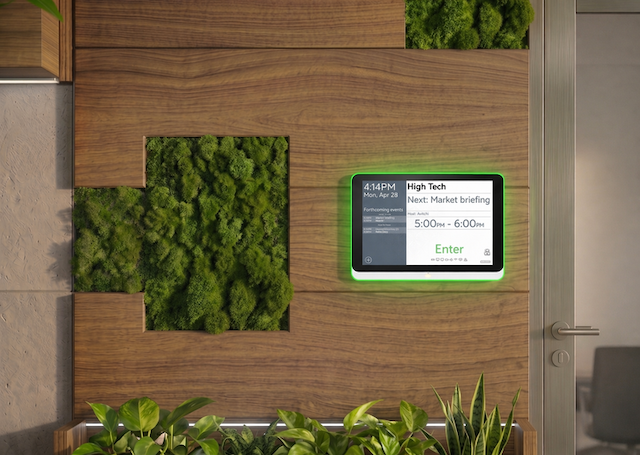
Good office etiquette requires good visibility. Your teams need to know a room is booked before they reach for the door handle. To give you an example, think of those moments when you need a room for a fast conversation, so you walk down the hall, peeking through glass walls, trying to determine if a space is safe to use. This is where purpose-built devices like the Door Tablet IDA-S and Door Tablet NXT show their value.
These displays feature integrated LED status bars that glow green when a room is free and red when it is booked. This simple visual cue prevents interruptions and accidental walk-ins. A person standing at the end of a long corridor can instantly see which spaces are available without having to squint at a small screen or open their laptop.
Matching the Room Booking Tablet to the Space
Not every meeting area needs the same type of display. You must match the hardware to the specific function and traffic flow of the floor.
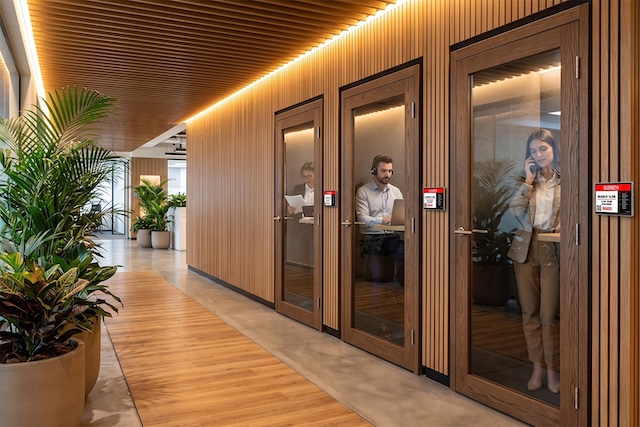
A compact 7-inch e-ink display fits the physical scale of single-person pods and small huddle spaces better than standard 10-inch screens. Mounting a large tablet on a narrow phone booth frame creates visual clutter and requires bulky mounting hardware. Small huddle rooms and glass-fronted phone booths benefit from e-ink displays. They resist glare and remain highly readable in bright ambient light.
Because they draw very little power, they operate for long periods without complex wiring installations, making them perfect for mounting on glass walls where hiding heavy power cables for larger LCDs is impossible.
Training rooms are perfect examples of where non-touchscreen tablets are the correct choice. These devices act as pure digital signage. They tell employees exactly what session is happening and who booked the space. Still, they prevent people from stopping in busy corridors to interact with the screen or accidentally altering a full-day schedule.
Main conference rooms and agile project spaces require a different approach. These high-traffic areas demand 10-inch or 15.6-inch high-resolution touchscreen tablets. As an optional feature, touchscreens allow you to enable PIN, RFID, or NFC card authentication. This allows employees to securely book, extend, or end meetings directly at the door using their existing building access badges.
Check the devices comparison page.
Simplifying Power and Connectivity
You do not need a construction crew or specialised AV integrators to deploy Door Tablet displays. Running new electrical outlets to every meeting room door is expensive and disruptive, which you can bypass completely by using Power over Ethernet. A single standard network cable delivers both power and a secure data connection directly to the tablet, allowing your internal team to plug it in without hiring an electrician or worrying about dead batteries.
The physical setup is entirely self-serve across any office architecture. You can use heavy-duty adhesive plates for glass partitions, standard flush mounts for drywall installations, or mullion brackets to attach screens directly to metal door frames. Once you attach the bracket, the tablet clicks into place and locks securely to prevent tampering.
Once the devices are on the wall, the manual work ends. The tablets receive software updates automatically over your network. Your IT team never has to walk around the office to manually update applications or reboot screens, which means your facilities team can outfit an entire office floor over a single weekend and immediately move on to other priorities.
Not sure yet which meeting room tablet to choose for your office? Book a demo with our team today.
Conference Meeting Room Tablet FAQs
Can I use consumer tablets for my meeting rooms?
Yes, you can. However, we recommend using commercial-grade hardware for better reliability, security, and long-term performance in workplace environments.
What is the minimum number of licences I need?
There is no minimum. You can get as many licences as you need for your office, whether that’s just a couple of meeting room tablets or a full rollout across your entire building.
What types of meeting room tablets does Door Tablet offer?
Door Tablet supports a range of devices to suit different environments, including touchscreen and non-touchscreen options, as well as energy-efficient e-ink displays.
Why should I choose interactive or non-interactive displays?
The choice of display type depends on the room's purpose. Interactive displays enable users to book, extend, or end meetings directly on the screen, making them suitable for any meeting room size. Non-interactive displays merely show schedules and room status, which could be beneficial for training rooms or phone booths. More details here.
Can I customise the design to match my company branding?
Yes, you can add logos, colours, fonts, and full custom branding.
What should I look for when choosing a room scheduling display provider?
Look for reliable hardware, calendar integrations, easy management, branding options, analytics, strong support, and scalability across multiple offices.
What OS does Door Tablet run on?
Door Tablet runs as a native application across multiple operating systems, including Android, iOS (iPadOS), Windows, and Samsung Tizen.