The Language Barrier in the Boardroom
There is a fundamental disconnect in how we talk about the office.
As an Office Admin or IT person, you live in a world of operational friction. You see the daily complaints from employees who can’t find a desk. You see the stress of teams wandering the halls in search of a meeting room. You're aware that a lack of proper tools is harming culture and productivity.
But your CFO lives in a world of financial risk.
When you walk into a budget meeting pitching a new workspace management system, you are often solving for friction. You talk about "employee experience," "seamless booking," and "modernising the workplace."
The CFO hears: “Expense. Complexity. Nice-to-have.”
To get the budget approved, you have to stop speaking "Operations" and start speaking "Finance." You need to prove that the cost of not acting is higher than the cost of the software.
Here is how to translate your technical needs into a financial business case that gets signed for any workspace tech you want to have in the office, including for meeting room displays.
1. Do Not Sell The Features
If you tell an executive you want to buy tablets to "make booking easier," they hear "convenience cost." But if you tell them you want to stop wasting 20% of your real estate budget, you have their full attention.
Real estate is usually the second biggest line item on a company’s P&L after salaries. If you are renting 10,000 square feet of office space, but your meeting rooms sit empty 40% of the time or worse, appear booked but are actually empty, that is cash being set on fire.
Frame the problem as efficiency, not technology.
- Don't say: "We need screens so people know which meeting room is free."
- Do say: "We are currently paying for meeting space that sits empty because our current system says it's booked. We need a tool to reclaim that lost inventory."
2. Quantify the "Ghost Meeting" Tax
The single biggest enemy of office efficiency is the "Ghost Meeting" (the recurring meeting that got cancelled, or the "quick sync”) that never happened, all while the room remains reserved on the calendar.
This is an office UX problem that bleeds money. When a room is "ghosted," two things happen:
- Hard Cost: The space is unutilized.
- Opportunity Cost: A team that actually needed to collaborate couldn't find a room, so they stayed home or huddled in a noisy cafeteria, lowering their output.
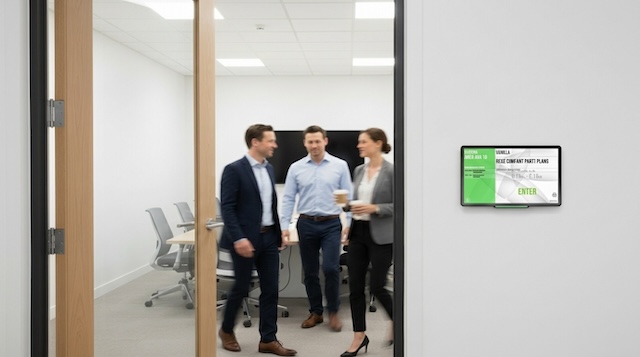
When pitching workspace management tools, focus on the automation aspect. Explain that modern room booking systems (like Door Tablet) require a check-in. If no one taps the panel or enters the room within 10 minutes, the room is released back to the pool. Always associate the features with a benefit or a high-impact outcome.
3. Calculate the Cost of Friction
Time is the other currency your CFO cares about. It sounds trivial to say "it takes a while to find a room," but let’s do the math on the chaos.
If a highly paid engineer or sales director spends 10 minutes wandering around the floor looking for a quiet space to take a client call, that is 10 minutes of high-value salary wasted. Multiply that by 50 employees doing it twice a week. The numbers get ugly, fast.
Position workspace tech as a friction-reducer. You are not buying hardware; you are buying back employee time. You are removing the barriers that make coming into the office feel like a chore.
4. Offer a Pilot, Not a Promise
Nothing scares a budget holder more than a massive, company-wide rollout that might fail. The easiest way to get a "yes" is to lower the stakes.
Don't ask for the budget to equip the entire HQ on day one. Ask for a budget to equip one floor or one high-traffic zone. Call it a "Data Gathering Pilot."
This approach does two things:
- It lowers the initial price tag to a petty cash level that is harder to reject.
- It allows you to gather real data. After 90 days, you can go back to the CFO with a report: "We increased room utilisation by 15% and killed 40 ghost meetings a week in Zone A. I’d like to scale these savings to the rest of the building."
5. The IT Angle: Security and Integration
If you are pitching to a CFO, you likely also need the CTO or CIO on board. For them, the argument isn't about desks; it's about security and stack consolidation.
Fragmented tools are a nightmare. Using one app for visitors, another for rooms, and a spreadsheet for desks creates security gaps and data silos.
- The Pitch: "This isn't just another tool to manage. It integrates with our existing Microsoft 365 / Google Workspace environment. It allows us to manage access rights, visitor badges, and internal bookings from a single pane of glass, reducing the burden on our Help Desk."
Do you know the ROI of the meeting room booking system? You will probably need to know how to explain it to your leader. We wrote an article that covers this exact subject here.
The Bottom Line
At Door Tablet, we build our hardware and software to be practical and durable. We don't sell hype; we sell meeting room displays that work.
But even the best tools need a champion. When you walk into that budget meeting next time, don't walk in as the person asking for money. Walk in as the person offering to save it.
If you are in the process of finding the right meeting room booking system and you are reading this article, this is your sign to book a demo with Door Tablet.
Key Takeaways:
- Reframe the Conversation: Stop selling hardware and start selling "Asset Intelligence" to optimise the company's second-largest expense (real estate).
- Monetise the Waste: Calculate the hard costs of "Ghost Bookings" (empty reserved spaces) and the soft costs of employee "Search Time" to prove the system pays for itself.
- Lower the Stakes: Avoid the mega-rollout fear by proposing a "Data Gathering Pilot" on a single floor to prove value before scaling.