Key Takeaways
Frame rules as solutions: Introduce regulations using simple language that addresses specific member pain points rather than sounding like rigid corporate mandates.
Automate space management: Utilise Door Tablet room displays and desk software to enforce schedules, prevent double bookings, and automatically release unused spaces.
Establish universal guidelines: Implement and display clear rules for noise zones, hot desk cleanliness, meeting room punctuality, and data security to maintain a high-functioning community.
How to create coworking space regulations that members actually follow?
Creating effective regulations requires writing clear, transparent policies that directly address daily workplace pain points and provide obvious benefits to the community. Framing rules as helpful guides rather than rigid corporate mandates ensures higher member buy-in.
Rules should use clear, simple, everyday language instead of generic corporate speak. When you write policies that explain exactly how a rule makes the workday smoother, people will follow them.
- Focus on how the rule solves a shared problem.
- Keep guidelines short, punchy, and easy to read.
- Avoid an overly academic tone or legal jargon.
- Inform members of the rules when they join your coworking space.
- Display the rules in shared spaces.
How to introduce new etiquette rules without causing friction?
Introduce new rules by framing them as practical solutions to specific system failures, such as the frustration of people taking calls in quite designated areas. Focus on the shared benefits of the new policy to gain immediate member support and reduce resistance.
- Announce the change by highlighting the problem it solves.
- Use relatable scenarios to explain the "why" behind the rule.
- Gather feedback to make members feel like collaborators.
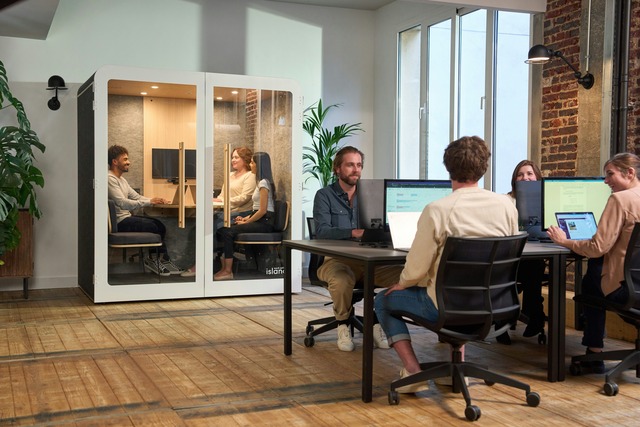
Etiquette for using and booking meeting rooms in a flexible workspace.
Meeting room etiquette demands firm start and end times to prevent schedule creep, alongside mandatory check-ins to release unused spaces. Members must book rooms in advance and vacate them immediately when their reserved time expires.
When one team overstays their reservation by ten minutes, a domino effect of delays hits everyone else. Solving this requires shifting away from manual schedules to reliable, automated systems.
- Book appropriately sized rooms for your group size.
- Check in to your meeting to confirm attendance and avoid hoarding space.
- Wrap up meetings 5 minutes early to allow smooth transitions between groups.
Door Tablet Booking Tablets and Hot Desks for Coworking Spaces
Door Tablet provides comprehensive hardware and software solutions designed to manage meeting rooms and hot desks in coworking spaces. These tools automate coworking space etiquette by offering clear visual indicators of space availability and enforcing booking rules.
Do not rely on a messy shared spreadsheet, as it inevitably leads to double-booked rooms and hallway arguments. Door Tablet Workspace Management Eco-system includes:
- Room Booking Tablets: Purpose-built hardware tablets placed outside rooms show real-time availability (red for occupied, green for available) and allow instant bookings or check-ins at the door.
- Desk Booking Software: Interactive digital floor plans let members reserve hot desks directly from the web browser.
- Automated Ghost Meeting Cancellation: If a member fails to check in on the hardware tablet within a set timeframe, the software automatically releases the room for other members.
- Desk Devices: Workspace Signage Touch displays placed on every desk to show which desk is available.
- ePaper Desk Devices: Energy-efficient and non-interactive displays that effectively communicate desk availability at a glance.
Coworking Space Rules Template
This template provides direct, actionable coworking guidelines addressed to members, framing etiquette as shared Office UX to ensure compliance. Use this template to create your own coworking space rules. Display the rules in the coworking office and in the community chats where everyone can see them.
1. Managing Noise and Focus Zones
Loud video calls in the open plan break the flow of the entire room and disrupt deep work. Protect everyone's acoustic boundaries by using the correct spaces for the right tasks.
- Take calls longer than five minutes inside the soundproof phone booths or in the meeting rooms.
- Check the digital floor plan to identify and respect designated quiet zones.
- Treat visible headphones as a universal "do not disturb" sign.
2. Meeting Rooms
Book meeting rooms for calls and for brainstorming activities. Do not use the meeting rooms unless you have booked in advance. Respect the start and end times of the meeting.
- Book your room in advance using the workspace app.
- Vacate the room immediately when your reserved time expires.
- Wrap up your meeting five minutes before your slot ends to give the next team a seamless start.
3. Hot Desks and Shared Kitchens
A hot desk only works if it is a blank slate for the next person. Leave every shared resource exactly as you found it to maintain a high-functioning environment for the community.
- Clear all coffee cups, notes, and personal items from your desk at the end of your booking.
- Do not leave a jacket or bag to "save" an unbooked seat for later.
- Place used dishes directly into the dishwasher, keeping the sink clear for everyone else.
4. Data Security and Privacy
Working in a shared environment introduces physical and digital vulnerabilities. Protecting your data ensures a secure baseline for every company in the building.
- Lock your computer screen every time you step away from your desk.
- Do not leave sensitive documents unattended on communal printers or hot desks.
- Register all guests at the front desk and escort them through the workspace.
5. Community Engagement
A coworking space thrives on the professional network it builds. Engaging respectfully creates a warmer, more productive environment for everyone without crossing boundaries.
- Introduce yourself to desk neighbours without interrupting visible deep work.
- RSVP to community events to help managers accurately order food and supplies.
- Report facility issues directly to the community manager rather than confronting other members.
FAQs
1. What are the main rules for coworking space etiquette?
- Keep conversations in designated collaborative zones.
- Never overstay a desk or room booking.
- Clean up shared kitchens and community areas immediately after use.
2. How do I handle members who ignore the rules?
Include a clear statement in the rules that outlines the consequences for everyone if they break the rules. This information should be visible to all members.
- Initiate a neutral dialogue framing the issue as a disruption to community flow.
- Revoke membership if systemic fixes and warnings fail.
3. Can coworking members book hot desks using Door Tablet?
Yes, members can reserve hot desks using the Door Tablet software platform. This allows users to locate and claim available workspaces instantly upon entering the building.
- Access booking maps via web browsers or booking kiosks.
- Filter desk availability by specific amenities, neighbourhoods, or quiet zones.
- Optional check-in functionality ensures reserved desks are actively utilised.
4. How many Door Tablet devices does a coworking space need?
Coworking spaces can deploy as many or as few Door Tablet devices as needed. The system is fully scalable with no minimum hardware requirements.
5. Can we trial the hot desk solution first?
Yes, the software is free of charge, and you can try the hardware for 30 days.
6. Can someone book for a colleague?
Yes, as an admin, you can set permissions to book for others and can be restricted by teams
7. Can there also be fixed desks?
Yes, you can use dedicated desks for a user that nobody can book.
8. Do you set up the floor plan for us?
No, you do it yourself. Our platform is very easy to use, and you get a floor plan editor. We have videos explaining what to do, and we provide support where needed.
9. Do we need screens on every desk?
Visitors can use a kiosk in the office to find their booked desk and make new bookings, allowing for less hardware use.
10. Can we see desk utilisation reports?
Yes, we have embedded analytics with lots of different reports, so you can see if certain desks aren't being booked and find out why.
11. What is the structure of the pricing?
Per desk, not per user.