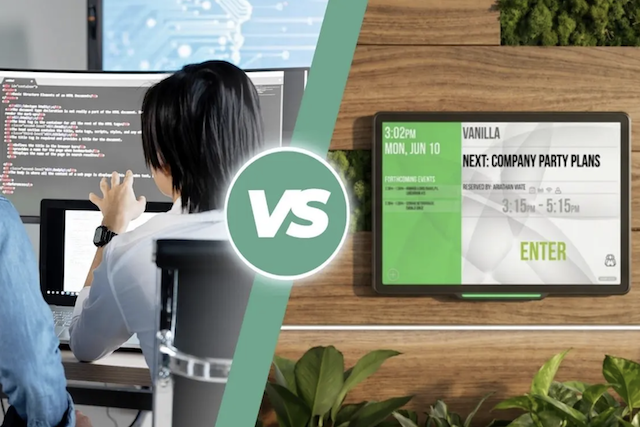
Balancing engineering priorities against everyday office operations is a common challenge for growing organisations. With the rise of modern development tools and generative AI, the temptation to build an internal scheduling tool has never been stronger. If choosing between buying a commercial room scheduling solution or building one in-house is on your table right now, let us look at which path truly makes sense for your business.
Key takeaways
- Internal builds create severe developer opportunity cost, pulling engineering teams away from revenue-generating products to manage non-core office scheduling systems.
- Generative AI accelerates basic code writing, not system architecture, leaving critical gaps in distributed state synchronisation, concurrency management, and long-term design governance.
- Cross-platform client and server demands multiply complexity, requiring teams to build and maintain separate codebases across web, mobile, calendar add-ins, and hybrid backend mail systems.
- Post-launch maintenance accounts for roughly 80% of total software costs, making custom tools far more expensive than predictable SaaS subscriptions.
- Custom applications fail at physical meeting room doors because consumer tablets lack enterprise resilience, and maintaining continuous firmware, PoE connectivity, and RFID compatibility requires dedicated Pro Hardware support.
The trap of "We'll Just Build It Ourselves"
The push for custom internal tools usually starts with the same alluring trap: "We have the developers, so why spend money on an outside solution when we can just build it ourselves for cheaper?"
Today, that argument often comes with a modern twist: "Can’t our developers just use AI to code this over a sprint or two?"
While generative AI tools can rapidly churn out boilerplate scripts and basic web forms, AI does not provide enterprise system architecture or long-term design governance. AI cannot architect a distributed, fault-tolerant infrastructure capable of handling race conditions when hundreds of employees book rooms simultaneously. Nor can it design a future-proof roadmap that adapts when underlying enterprise identity frameworks or calendar APIs change. Code generation is fast; architecting and maintaining resilient enterprise systems is a multi-year discipline.
Once projects launch, internal teams quickly encounter the scope creep waterfall. A basic calendar connection must expand to handle interactive floorplan engines, single sign-on (SSO) protocols, complex user permission hierarchies, and multi-tenant security structures. What was scoped as a brief project turns into an ongoing multi-year software development lifecycle.
This shift creates a severe developer opportunity cost. When you pull core software engineers off your commercial, revenue-generating products to debug internal scheduling tools, your primary business suffers.
Internal builds introduce significant financial trade-offs and risks:
- Creating a Minimum Viable Product (MVP) takes at least 6 to 10 weeks of engineering time. In comparison, setting up a commercial Software as a Service (SaaS) solution only takes about 14 days.
- Engineering salaries for a four-person internal build team average £360,000 in upfront labour costs alone.
- 52% of all projects experience scope creep.
- Upward of 80% of total software cost occurs during the post-launch maintenance phase, not the initial build.
- Internal dev teams spend approximately 38% of their time managing software bug fixes.
The architectural maze: diverse front-ends and hybrid backends
A robust room booking ecosystem is not a solitary web dashboard, it is an intricate, multi-tier distributed environment. An internal build forces your engineering team to design, support, and continually patch two highly fragmented layers:
1. Fragmented client front-ends
Employees expect to book workspaces from wherever they happen to be working. Delivering an acceptable user experience requires building and maintaining distinct client applications:
- Responsive desktop browser portals.
- Native iOS and Android mobile apps.
- Native calendar add-ins for Microsoft Outlook and Google Workspace.
- Interactive wayfinding kiosks and interactive floor plans.
- Dedicated, locked-down room display interfaces.
Each front-end demands its own UI framework, device testing protocols, authentication lifecycle management, and regular operating system update maintenance.
2. Hybrid client-server synchronicity
Behind the user interface lies the challenge of server integration. Enterprise organisations frequently operate across heterogeneous environments, spanning Microsoft 365, on-premises Microsoft Exchange, Google Workspace, or HCL Domino.
Building an engine that handles bi-directional real-time synchronisation, webhook subscriptions, granular delegate permissions, and calendar conflict resolution without double-booking rooms introduces an enormous architectural burden. If your sync engine drops a single webhook or mismanages a recurring reservation edge case, meetings collide and office operations stall.
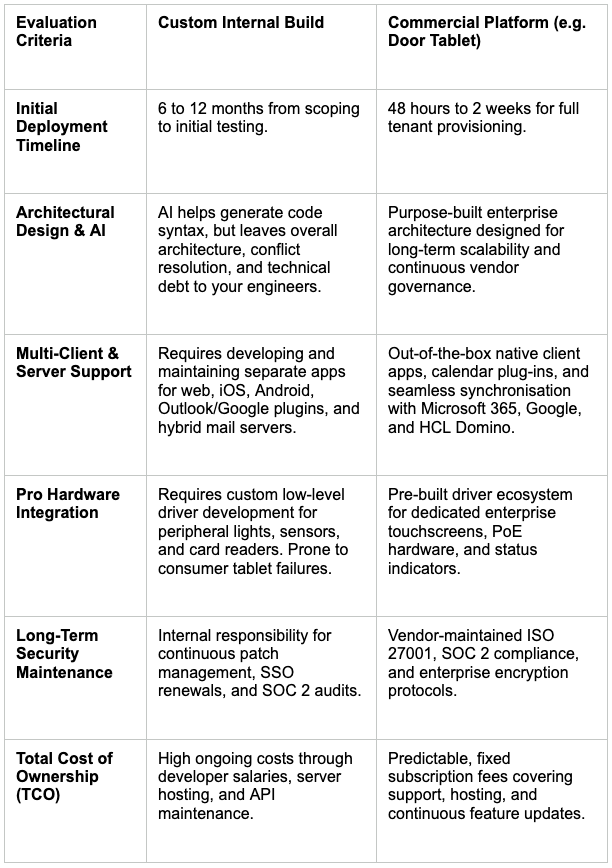
Head-to-head breakdown: internal builds vs. commercial platforms
The hardware integration barrier: why custom apps fail at the door
Workplace software does not live entirely in the cloud; it depends heavily on on-site, physical touchpoints. This is where internal software projects face their steepest hurdle: bridging cloud databases with physical meeting room wall endpoints.
Many internal builds begin by mounting consumer tablets (such as iPads or consumer Android devices) to walls using generic enclosures. However, consumer hardware is not engineered for 24/7 commercial operation. Continuous power causes battery swelling and hardware failure, standard screens suffer from severe burn-in, and unpredictable operating system popups interrupt meetings.
True enterprise reliability requires integration with dedicated Pro Hardware:
- Peripheral status controls: Interfacing directly with hardware controllers to drive real-time side-bar LED status indicators (green for available, red for booked) and occupancy sensor relays.
- Enterprise badge authentication: Native low-level driver support for multi-frequency RFID, NFC, and HID card readers for instant tap-to-book and tap-to-release check-ins.
- Power over Ethernet (PoE): Industrial-grade network connectivity and power delivery over a single cable, bypassing unstable office Wi-Fi networks.
- Locked-down firmware: Purpose-built kiosk firmware that prevents tampering and automatically recovers after power or network interruptions without manual IT intervention.
Writing a basic tablet user interface application is straightforward. However, maintaining continuous firmware compatibility and low-level peripheral drivers across dozens or hundreds of hardware wall endpoints is where internal IT resources break down. Commercial systems like Door Tablet eliminate this friction by providing dedicated hardware and software ecosystems engineered to work together without custom code.
FAQ’s
Can't our developers just use AI to build a room booking app quickly?
AI coding assistants are effective at generating code snippets and basic UI components, but they cannot design resilient system architecture. AI cannot resolve multi-system calendar race conditions, architect cross-platform state synchronisation across Microsoft 365 and Google Workspace, or write the low-level firmware drivers needed to communicate with physical door display hardware and RFID readers.
What are the main disadvantages of building custom workplace tools?
The main disadvantages are the high total cost of ownership, severe developer opportunity cost, and long-term maintenance debt. Internal teams must continually update APIs, patch security vulnerabilities, maintain multiple client codebases, and rewrite drivers for office hardware, diverting engineering resources away from the company's core commercial products.
Why do custom apps struggle with dedicated door displays?
Custom applications rarely integrate natively with professional meeting room displays. Enterprise door panels require specialised low-level firmware to manage hardware peripherals like external LED status lights, multi-format RFID badge readers, and PoE power negotiation—capabilities that commercial platforms support natively out of the box.
Should you build it yourself?
Unless your company's primary commercial revenue engine is workplace facilities optimisation, building an internal platform incurs a net-negative ROI. The hidden development debt, the architectural complexity of multi-client and server ecosystems, and the specialised demands of Pro Hardware integration make commercial acquisition the clear, financially sound choice.
Contact our team to discover how Door Tablet delivers a comprehensive, enterprise-ready room booking ecosystem tailored to your workspace.