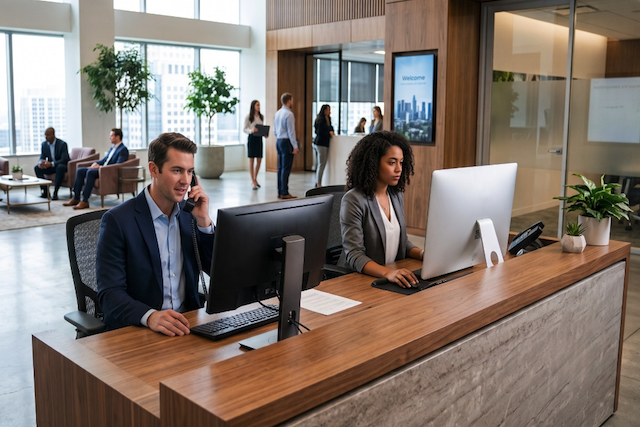
The front desk of a busy corporate office often doubles as an air traffic control tower. The receptionist spends hours gatekeeping space, managing scheduling changes, and sorting out double-bookings. This manual process creates a single point of friction for everyone involved. There is a clear solution that both your teams and your reception staff will appreciate. Conference room displays can simplify the booking process and improve efficiency.
These digital tablets show real-time room availability, automate scheduling, and prevent common issues like double bookings and interruptions.
Key Takeaways
- Managing meeting rooms with manual spreadsheets creates costly bottlenecks like double bookings, administrative burnout, and a total lack of visibility into how office space is actually used.
- Digital room displays connect directly to your existing corporate calendar to sync availability in real time, eliminate ghost meetings through check-in requirements, and allow instant booking right outside the door.
- Implementing a successful display solution requires a phased rollout starting with a small pilot program and selecting software that integrates natively with your current IT infrastructure.
The Bottlenecks of Manual Workspace Management
Relying on human input to manage physical space introduces friction that slows down your teams. Based on our work with clients who adopted Door Tablet to fix their manual room booking issues, we frequently see the same frustrations pop up. Specifically, anyone tasked with managing office meeting space usually runs into these three significant bottlenecks:
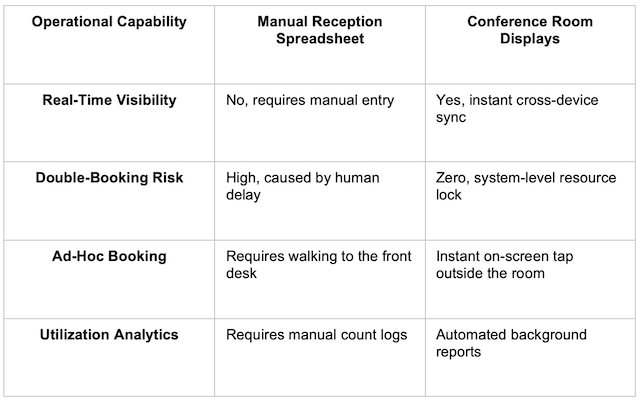
- Interruption friction: Employees walk into active sessions because a paper list or spreadsheet was not updated fast enough. Ghost meetings can occur, leaving the space empty while others struggle to find a place to work.
- Receptionist burnout: Front-desk staff spend their day field-testing room availability and moving calendar invites instead of focusing on client experience and high-value operations.
- Zero analytical visibility: A spreadsheet cannot track actual space utilisation data. Without automated logs, workplace teams cannot see which rooms sit empty or which sizes are in highest demand, leaving management blind when planning real estate needs.
How Room Displays Work
Moving away from static files to connected infrastructure links your physical workspace directly to your digital calendar. The system operates in a continuous loop. When an employee books a meeting through scheduling platforms such as Outlook or Google Workspace, the central calendar immediately pushes the update to the tablet hardware outside the room. The display instantly updates its status, changing the outer LED lights from green to red to show the room is occupied.
Reception Spreadsheet vs. Conference Room Displays
Implementing a Display Solution in Your Corporate Office
Deploying digital displays requires coordination between facilities and your IT procurement team. The process depends on selecting a compatible solution like Door Tablet that fits your office and IT infrastructure.
Hardware choices
Purpose-built panels are designed for commercial environments, featuring secure enclosures and integrated side-facing LED status indicators that show room availability from down the corridor.
Software integration
A native enterprise engine connects directly into your existing architecture, such as Microsoft 365, Google Workspace, or Exchange. This connection path means your IT team can deploy the software without rebuilding directories, creating new user databases, or managing separate standalone credentials.
Checklist for success
- Build a business case for the new conference room display solution for the shareholders.
- Start with a limited rollout. Test the new workflow in just a few rooms first, then scale the deployment to the rest of the office once your team is comfortable.
- Create a simple user onboarding guide explaining how to check in on screen and book ad-hoc sessions.
Read How to Make Sure Your Teams Will Adopt New Technology in the Workplace.
FAQs
How does room display software integrate with existing calendar systems?
Modern room display software functions as a cloud or on-premise connection layer that communicates directly with your existing corporate calendar infrastructure. This direct connection avoids data duplication and ensures your calendar remains the single source of truth.
How do room displays prevent ghost meetings?
Displays can require users to check into their rooms with an on-screen tap when the meeting begins. If a team fails to check in within a defined window, such as 10 minutes, the system automatically cancels the reservation and releases the room back into the available pool.
Can we mount room tablets on glass walls?
Yes. Specialised mounting kits allow facilities teams to attach tablets securely to glass walls outside modern meeting spaces. These kits include slim architectural frames that keep Power-over-Ethernet cables hidden from view, maintaining a clean office aesthetic.
Next Steps for Your Workplace
Continuing to manage a corporate office with manual spreadsheets creates administrative drag and wastes valuable room capacity. Upgrading to dedicated infrastructure removes the receptionist from the role of traffic controller and gives your employees instant clarity over where and when they can work.
If you're ready to trade manual spreadsheet tracking for seamless booking, contact our team to view a live walkthrough of the Door Tablet scheduling system.