We will explain the structural and functional differences between digital signage and a dedicated conference room display setup in corporate properties. You’ll have a clearer picture for evaluating your facility's layout, making it easier to pick the perfect tool that fits your operational needs!
3 Key Takeaways
- Purpose-Driven Choice: Select a dedicated room panel to coordinate physical spaces and resolve booking conflicts, but use digital signage for broad, top-down communication.
- Interactivity Matters: Room panels rely on active touchscreen input for instant scheduling right at the door, whereas digital signage screens operate as passive informational monitors.
- System Integration: Effective space management requires direct link-ups with your corporate calendars, while signage relies on distinct content playback lists.
What is a Conference Room Display?
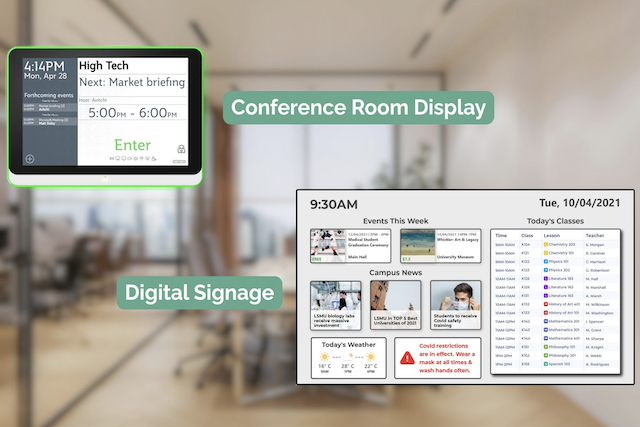
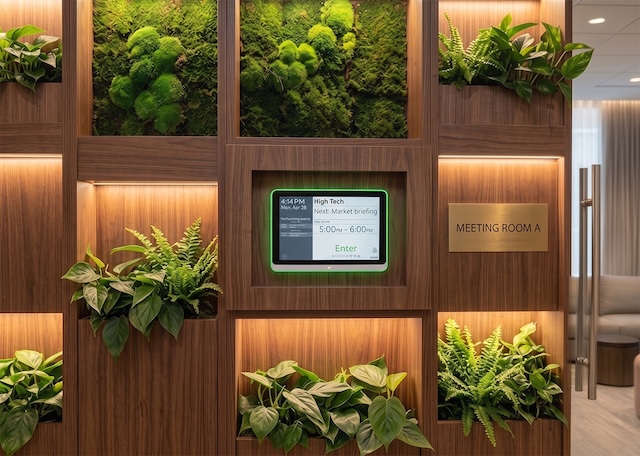
A conference room display is a purpose-built, interactive tablet fixed outside a meeting space to handle scheduling right at the door. It serves as the physical touchpoint for your meeting room scheduling software, indicating whether a room is occupied or available. This type of room booking display allows employees to see the daily schedule at a glance or walk up and reserve the space instantly for an impromptu chat. The software pulls live data directly from your company calendars to display the live status of every room on the displays.
What is Digital Signage?
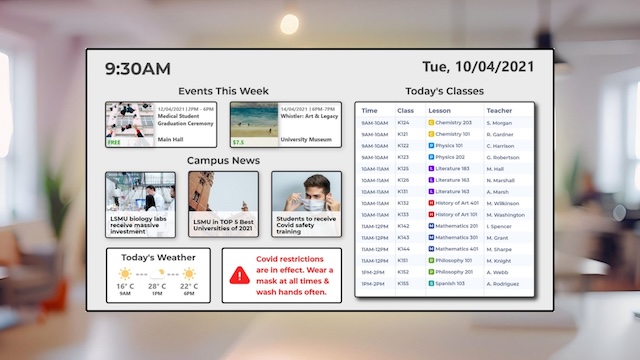
Digital signage represents a much broader category of screens used for one-to-many corporate communications. You typically find these large, non-interactive monitors in reception areas, cafeterias, or main corridors. Facilities teams use digital signage software to display company dashboards, event schedules, or wayfinding screens to guide visitors. These screens are excellent for broadcasting information to everyone at once, but they do not allow employees to manage or book the physical spaces where they sit.
Key Differences: Conference Room Display vs. Digital Signage
| Feature |
Conference Room Display |
Digital Signage |
| Primary Purpose |
Space booking and room coordination |
Corporate messaging and announcements |
| Interactivity |
High touchscreen capability |
Passive viewing only |
| Hardware Setup |
Purpose-built tablets and secure mounts |
Commercial displays or standard monitors |
| Core Integrations |
Workplace calendars and booking systems |
Content management platforms |
| Typical Placement |
Outside meeting rooms and huddle spaces |
Lobbies, cafeterias, and main hallways |
Primary Purpose and Use Cases
Meeting room booking signs exist to solve a coordination problem. They give your teams clarity over who owns a space and for how long. Digital signage operates as an internal broadcasting channel, turning bare walls into knowledge hubs for general updates.
Interactivity and Touch Capabilities
A booking panel relies entirely on touch. Employees use the screen to check into a meeting, extend their session, or release a room early if they finish ahead of schedule. Digital signage is entirely passive, meaning employees look at it but never touch it.
Software and Calendar Integrations
To prevent scheduling headaches, a booking screen requires calendar integrations with platforms like Google Workspace and Office 365. It must update instantly when someone cancels or books a meeting online. Digital signage relies on content loops managed through a central media player rather than corporate calendars.
Hardware Specs and Mounting Options
Dedicated room tablets require specific hardware features to survive daily office life. They use Power over Ethernet (PoE) to get power and network data through a single cable, keeping installations tidy. They also feature prominent LED status lights that glow red or green so people can see availability from down the corridor.
When to Choose Conference Room Displays
You should invest in conference room displays if your current office layout suffers from constant scheduling friction. If employees routinely argue over who booked a room, or if spaces sit empty because of ghost bookings, a physical panel fixes the issue. It improves office productivity by enabling quick, ad-hoc meetings right at the door. It gives your team confidence that when they book a room, it will actually be available.
Introducing new tools to your workspace shouldn't feel like an uphill battle. Your team does not need overcomplicated technology that requires extensive training just to book a room. This common scheduling problem can be solved easily with a proper workspace assessment and a clear rollout strategy. We are here to simplify your environment, not to develop new problems for your teams.
When to Choose Digital Signage
Digital signage is the correct choice when your primary goal is community building and top-down communication. It belongs in your lobby to welcome clients, or in the breakroom to display company milestones and social updates. If you need to show real-time metrics, emergency alerts, or simple building directions, these large-format screens are the most effective tool for the job.
Top Features to Look for in a Conference Room Display
When assessing options for your meeting rooms, focus on practical features that address real workplace frustrations. Avoid overcomplicated tech and look for systems that can handle both specific room management and broader facility communication.
Door Tablet provides the hardware and software to run all your office displays from a single system. Our software manages the touchscreens outside your meeting rooms, so your team can check in or book spaces instantly. Door Tablet SIGNS allows you to display room availability alongside other content on larger digital signage displays in your hallways and lobby. Key features:
- Visible LED Status Lights: Door Tablet hardware uses clear lights so employees can spot an available room from a distance without walking up to read the text.
- Power over Ethernet (PoE) Support: Running a single cable through drywalls or onto glass frames makes installation simple and clean.
- Dual-Purpose Flexibility: Software that can run scheduling templates at the meeting room door while pushing company announcements to larger lobby monitors.
- Commercial-Grade Build: Choose screens designed for continuous operation and capable of handling hundreds of daily touches.
Making the Right Choice for Your Office Space
Optimising your workplace requires choosing tools that match the specific problem you are trying to solve. If your priority is fixing communication gaps in common areas, digital signage is your best bet. However, if you want to eliminate calendar confusion and improve how your teams interact with their physical workplace, dedicated conference room displays are the tool you need.
Explore how Door Tablet's dedicated displays can restore order to your meeting rooms. Book a demo call.
FAQs
Can I use a standard tablet as a conference room display?
You can, however, standard tablets lack PoE support, and external LED status lights. They are not built for continuous interactive use at a room entrance and cannot run dedicated room scheduling software effectively.
Do conference room displays require special scheduling software?
Yes. They require specific software to link the physical screen to your corporate calendar. This connection ensures that door bookings sync instantly with your digital schedule.
What is the difference between a meeting room display and an interactive flat panel (IFP)?
A meeting room display is a small tablet mounted outside the door for booking. Interactive flat panels (IFPs) are large, TV-sized touchscreens installed inside the room used for presentations and collaborative whiteboarding.