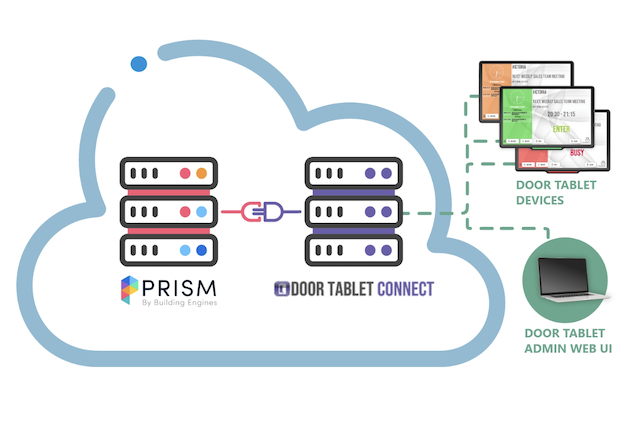
Connecting Door Tablet to Prism turns your building management system into a tool that your tenants can actually see and use every day. Linking this platform with Door Tablet’s screens allows everyone to see the real-time status of every room in the building at a single glance.
We will cover how Building Engines Prism integrates with Door Tablet’s room booking tablets and how their features and benefits help property managers and tenants stay organised.
What is Prism by Building Engines?
Prism by Building Engines is a powerful platform used by property managers to run commercial buildings. It handles everything from maintenance work orders to tenant communication in one place.
One of its most useful software tools within the larger platform is resource reservation. This allows people in the building to reserve shared spaces like conference rooms or meeting rooms using their phones or computers. For building managers, these shared spaces are vital amenities used to attract tenants and increase the occupancy, and therefore the rental income, of the building.
How Door Tablet Connects with Prism
Door Tablet acts as the physical screen outside your rooms that shows what is happening inside Prism. We connect directly to the Prism booking system so that the information stays the same in both places.
Door Tablet is designed specifically for the multi-tenant environment. It liberates building staff from manually managing meeting centers by allowing tenants to self-serve. When a user walks up to the screen, they can book a room for “now” or for the future, by simply entering their email and a unique Employee ID. This ensures the reservation is linked to a specific tenant account rather than a system admin, providing a full audit trail for billing and usage reports.
The entire system is driven by a central server hosted on the cloud. While Door Tablet can work on-premise, for Prism users, the solution is typically offered as a shared, multi-tenant cloud platform, removing the need for building managers to handle complex IT infrastructure.
Features and Benefits
Connecting Door Tablet with Prism makes your office run better by putting digital schedules right where people need them. Here is how it helps:
- Tenant Accountability & Revenue: Generate precise usage reports by company or individual. This allows managers to easily invoice tenants for room usage and boost building ROI.
- Enhanced Security: Mandatory Employee ID verification prevents "identity hijacking" at the display. If a user forgets their ID, they can trigger a self-service recovery email directly from the tablet.
- Higher Utilization: Shared amenities are only valuable if they are used. Door Tablet increases visibility for every resource in your building, from large executive boardrooms down to single huddle spaces and shared desks.
- Total Building Visibility: Beyond individual doors, our wayfinders allow tenants to see the status of multiple rooms at once on large screens. These can be seamlessly combined with digital signage to create a helpful atmosphere in your lobby or elevator banks.
- Staff Liberation: By allowing tenants to book rooms securely on their own, your building management team is freed up to focus on higher-value hospitality tasks.
- Match Your Brand: To maintain a professional building identity, you can customize the interface with your organization’s logo and typography, ensuring the hardware feels like a native part of the building. See how you can make Door Tablet yours here.
- Versatile Hardware Options: We offer a wide range of hardware to fit any building requirement. The system works seamlessly across multiple platforms, including Door Tablet ePaper displays (EPS), Android, and Tizen devices. Explore Door Tablet’s hardware options here.
Door Tablet integrates with Prism to make resource reservation easier for everyone in your building. This partnership empowers tenants to self-service key amenities, such as meeting rooms and shared workspaces.
Find out more details about the integration between Door Tablet and Prism.
Create an account to watch how to set up the integration between Door Tablet and Prism.