
Key Takeaways
- Relying solely on calendar reservations obscures true office occupancy and wastes resources.
- Mandatory check-ins at interactive displays eliminate ghost meetings by automatically releasing unused rooms.
- Combining booking data with environmental sensors reveals the real reasons staff avoid specific workspaces.
Facility managers and office admins must track specific metrics to understand true meeting room utilisation and office occupancy. Walking into a building where the calendar is full but half the rooms sit empty is an expensive problem. Fixing this disconnect requires ignoring standard calendar reservations and measuring physical usage.
This guide acts as a glossary of the core metrics you need to evaluate your workspace. We cover what you should be measuring, from no-show rates to thermal comfort. Door Tablet hardware and software capture these metrics.
Moving to smart platforms like Door Tablet allows you to see exactly what is happening in your building.
1. The No-Show Rate (Booked vs. Actual Occupancy)
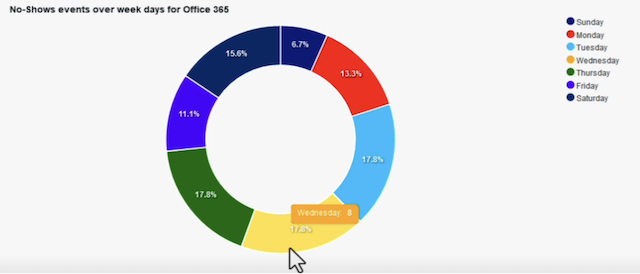
Ghost meetings drain office efficiency. Recurring meetings remain on calendars long after attendees stop showing up in person. The room appears booked, yet it sits vacant.
Door Tablet’s system explicitly counts meetings that were scheduled but never checked into. These would be the ones Door Tablet cancelled automatically for no-show or that were otherwise marked as not happening. You could rank rooms by no-show count or see how no-shows as a percentage of bookings change over time (perhaps after implementing new policies).
Door Tablet solves the ghost-meeting problem through mandatory check-ins at interactive displays. The process is straightforward. Attendees must tap the screen outside the room to claim their booking. If nobody checks in within a set timeframe, the software automatically releases the room back into the system. This immediate release reclaims valuable space and prevents unnecessary real estate expansion.
It is worth noting that check-in is an optional feature. However, when enabled, attendees are required to check in, which allows Door Tablet to capture accurate no-show data and reporting.
You can’t manage what you don’t measure.
2. Workspace Utilisation Rate (Capacity vs. Attendance)
A twenty-person boardroom occupied by two colleagues wastes premium real estate. Room capacity means little without understanding actual attendance.
Analysing usage patterns through Door Tablet analytics helps businesses identify these spatial mismatches. You can see exactly how often large rooms are booked for tiny gatherings. Facility managers can use this data to carve up massive, under-utilised rooms into smaller, highly sought-after collaboration pods.
Matching room size to actual meeting sizes optimises the entire floor plan.
3. Ad-Hoc Booking Ratio (Spontaneous vs. Scheduled Usage)
Staff often interact with the office on the fly, so they need spontaneous spaces for quick catch-ups.
Comparing bookings to walk-up reservations provides vital insight into the true rhythm of your workforce. Door Tablet touch displays let staff grab a free room instantly right at the door. Tracking this ad-hoc booking ratio shows whether your current space allocation supports spontaneous collaboration or forces employees into rigid schedules.
Learn more about Door Tablet Embedded Analytics
4. CO2 and Air Quality Levels
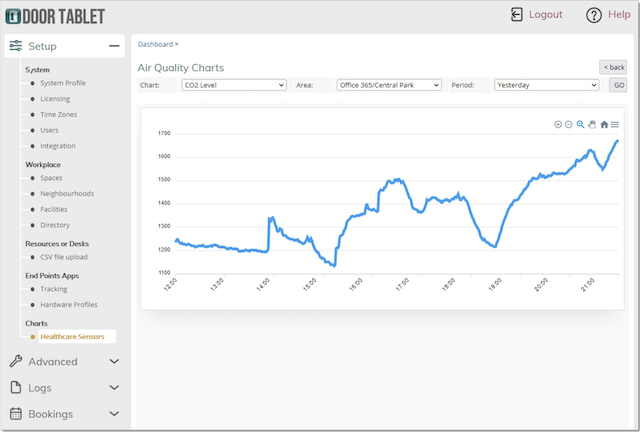
Air quality serves as an invisible proxy for occupancy. High CO2 levels clearly indicate a room was recently bustling with people.
Door Tablet integrates directly with environmental sensors to connect air quality data with booking data. This combination shows not just if a room was booked, but if it was safely and comfortably ventilated during use. Monitoring CO2 ensures your busy meeting spaces remain productive environments rather than stuffy boxes that cause fatigue.
5. Thermal Comfort Index
When a well-equipped room is consistently ignored by staff, the booking system is rarely the culprit. The space might simply feel like a sauna. In fact, temperature and air quality are consistently among the top workplace complaints – surveys have found that temperature is the number one office complaint employees raise, often surpassing noise.
Temperature and humidity dictate comfort. Door Tablet smart sensors allow you to correlate room abandonment rates with thermal data. If a specific room shows a high rate of early check-outs, reviewing the temperature data often pinpoints HVAC failures or identifies sun-trap rooms.
Turning Metrics into Confident Estate Decisions
Raw data provides no value unless it drives action. Tracking no-shows, utilisation, and environmental factors gives facility managers a complete picture of office health.
Door Tablet analytics allow businesses to confidently resize their real estate footprint based on facts. You can lower energy bills by shutting down unused zones, repurpose dead space, and build an office that employees like to be in. The right metrics turn guesswork into a precise facility strategy. Book a demo today with us!