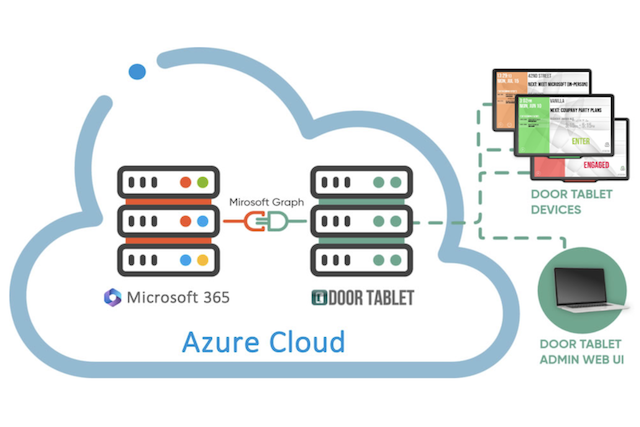
Door Tablet integrates natively with Microsoft 365 to improve your office room booking process. This applies to all versions, and importantly Microsoft GCC High users in North America.
We will explain exactly how connecting purpose-built hardware to your digital calendar fixes the disconnect between booking a room online and using it in person.
We will walk you through exactly what you need to know to make your workplace run smoothly. You will learn how to eliminate double bookings, how your team can book rooms directly from a hallway display, and the key features of this integration.
Key Takeaways
- Native Microsoft 365 integration prevents double bookings: Door Tablet reads and writes directly to your calendar data without a middleman, solving the problem of invisible scheduling errors.
- Door Tablet hardware provides direct hallway access: These purpose-built booking tablets allow employees to reserve meeting rooms instantly by interacting directly with the company’s Microsoft 365 calendar.
- Flexible and secure deployment for IT teams: The solution is built on the Microsoft Graph API and can be deployed on the cloud or on-premise to match specific security and infrastructure needs
Why do meeting rooms still get double-booked in Microsoft 365?
Microsoft 365 meeting rooms still get double-booked because of improper calendar configurations and manual user errors that bypass the automatic scheduling system. When room mailboxes are not set to decline conflicting meetings automatically, the digital calendar fails to prevent overlaps and creates awkward situations where two groups show up for the same space.
Without booking tablets outside the room to display the live Microsoft 365 schedule, these technical and human errors remain completely invisible to the rest of the office. The error only becomes obvious when an officially scheduled group walks in and has to interrupt the people who are already sitting there awkwardly.
How do you integrate a room booking tablet with Microsoft 365?
You integrate a room booking tablet with Microsoft 365 by securely connecting the software natively to your existing digital calendar. Because Door Tablet integrates natively with Microsoft 365, it accesses your scheduling system directly.
This direct connection ensures the physical display outside the room is always looking at the true, live state of your Outlook calendar, eliminating any synchronization lag or conflicts.
Your IT teams will appreciate that the Door Tablet runs on the cloud or on-prem, giving you total control over your security and infrastructure.
What are the key features of Door Tablet's Microsoft 365 integration?
The key features of Door Tablet’s M365 integration ensure your physical office and digital workspace are aligned through secure, direct access. These features include instant calendar interaction, flexible deployment options, and native video conferencing tools.
When you connect your scheduling system to our purpose-built displays, you get a complete workspace management solution. The system is designed to make hybrid work straightforward by offering several practical capabilities:
- Direct Calendar Access: Door Tablet interacts directly with your Microsoft 365 calendar. There is no synchronization process, meaning bookings made on the tablet or in Outlook are instantly visible on both ends without risk of falling out of sync.
- Secure and Scalable: Built on the Microsoft Graph API for robust security and future-proof performance (ideal for SMEs and global enterprises alike)
- Flexible deployment: You can run the software on the cloud, on-prem or on Door Tablet CONNECT, allowing the system to adapt to your specific IT infrastructure and security requirements.
- Native video scheduling: Your team can add a Microsoft Teams or Zoom link right from the Door Tablet interface to accommodate remote participants.
- Customisable displays: You can tailor the screens with your organisation's logos and business rules so the technology visually matches your office environment.
- Wayfinding Integration: Your teams can view live room availability and bookings, directly through the wayfinding system, which pulls data directly from Microsoft 365 in real time, making it easy to find and navigate to available spaces.
Why do organisations choose Door Tablet for Microsoft 365?
Organisations choose Door Tablet because it removes the daily issues of finding a place to collaborate, drastically improving office efficiency.
It supports hybrid work by empowering employees to book spaces seamlessly. While meeting rooms are accessed directly via Microsoft 365, desk bookings are managed through our BOOKER system utilizing Microsoft 365 SSO to keep the user experience entirely seamless.
Workplace experience managers benefit from seeing exactly how their space is being used. Door Tablet provides actionable insights into room usage and no-shows, helping you optimise your floor plan based on real data. The displays are also customisable. You can tailor the screens with your organisation’s logos and brand colours so the technology visually matches your office environment.
What are the best tablets compatible with the Microsoft 365 booking system?
The best tablets compatible with the Microsoft 365 booking system are purpose-built hardware displays that connect directly to your digital calendar. In essence, any tablet from the Door Tablet ecosystem works natively with Microsoft 365 to manage your workspace.
Depending on your specific office setup, you can choose from dedicated meeting space devices like:
Check our hardware ecosystem.
How do you get started with Door Tablet and Microsoft 365?
Getting started with Door Tablet and Microsoft 365 is as simple as authorising the secure connection to your tenant and assigning your room calendars. You can go from installing the hardware to a fully operational room booking system with direct calendar access by following a few simple configuration steps.
You do not need a large deployment team to complete the setup. By following our clear step-by-step guides and videos, your IT team can configure calendars and authorise permissions easily.
It is a practical way to quickly improve your workplace experience.
See more details about the integration between Door Tablet and Microsoft 365.
Create an account to watch how to set up the integration between Door Tablet and Microsoft 365.
Frequently Asked Questions (FAQ) about Door Tablet and M365
1. Do I need special IT skills to connect Door Tablet to M365?
No. If you are familiar with your Microsoft 365 admin centre, you can set this up. The process involves standard authorisation steps that only take a few minutes.
Is the M365 integration secure? Yes. Door Tablet provides security and privacy at all levels and runs on the cloud or on-prem. The product is trusted by defence companies, law firms, and financial institutions to ensure data remains protected.
2. Will this work with our existing M365 room resources?
Yes. Door Tablet maps directly to the room calendars you have already built in Microsoft 365. You do not need to recreate your office directory because the system reads your existing data and displays it on the screens outside your rooms.
3. Can you book a room directly from a tablet using Office 365?
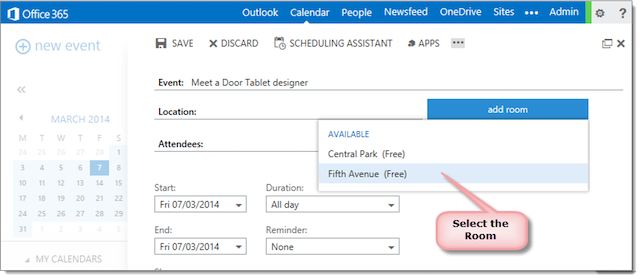
Yes. You can book a room directly from a tablet using Office 365. The hardware provides clear room status and allows for booking with rich automation and control right at the meeting space.
4. Does Door Tablet integrate with Microsoft 365 GCC High?
Yes. Door Tablet integrates natively with Microsoft 365 GCC High. Door Tablet enables secure, compliant room booking tailored for Microsoft 365 GCC High environments. More details here.