Key Takeaways
End the daily hunt for meeting space. Door Tablet connects straight to your core calendar to provide instant, reliable room availability. This stops the frustrating cycle of teams wandering the halls and arguing over double bookings.
Recover wasted office real estate. Door Tablets have automated check-ins to clear out ghost meetings; the system returns your unoccupied rooms to the schedule immediately.
Buy exactly what your layout needs. We do not force you into rigid hardware bundles or minimum order quantities. You purchase only the Door Tablet units and licences that fit your current office, keeping your budget firmly under control.
How does a dedicated room tablet solution resolve office scheduling conflicts?
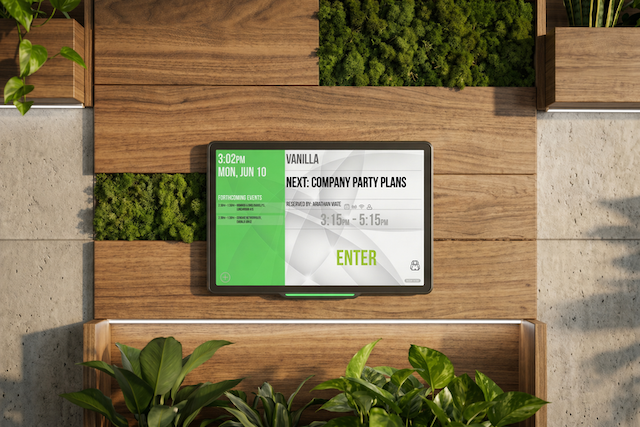
A dedicated room tablet provides an immediate visual status of room occupancy right at the door. It replaces the frustrating manual loop of refreshing your laptop calendar, walking over to a supposedly free room, and having to guess if the people sitting inside are just wrapping up or squatting.
You no longer have to pace the halls or peer through glass doors to figure out if a space is actually available. Door Tablet plainly shows if a space is available, booked, or occupied via our room displays. The bright LED indicators let staff see room availability from all the way down the corridor, putting an end to the awkward habit of peering through glass doors.
Putting the schedule on a physical screen next to meeting rooms creates a shared sense of accountability. It makes the room's status public and undeniable, which prevents unauthorised use and plugs massive productivity leaks across your floor plan.
- Poorly managed meetings cost companies $37 billion in lost productivity every year, largely due to inefficient scheduling and underutilised spaces.
- Nearly half (48%) of office workers waste time each week hunting for a free room, with some losing up to 30 minutes a day just wandering the halls.
- When you look at booked versus actual usage, up to 30% of scheduled meetings turn out to be no-shows.
Why is direct calendar integration essential for a meeting room booking system?
Waiting for a booking system to sync is exactly how double bookings happen. Door Tablet fixes this by connecting directly to the calendar you already use, such as Microsoft Outlook or Google Workspace, without routing through slow external databases. See all Door Tablet’s Integrations.
This direct connection means if you book a room from your laptop, the tablet outside the door updates instantly. The reverse is also true. If someone walks up and grabs a space directly from the screen, your central calendar reflects it immediately.
In-office teams already spend an average of six minutes just getting a hybrid meeting started. Removing the friction of delayed system updates means your staff can stop worrying about scheduling errors and simply get to work.
What are the key features of an effective meeting room booking system?
A corporate meeting room booking system needs more than just a digital sign. It requires direct calendar integration, localised booking, and automated room management. We provide these features through stable hardware that gives you real-time visibility and control across your meeting rooms.
- Staff can search the floor plan and book any available room directly from the screen in front of them.
- Purpose-built hardware stops the lagging and connection timeouts common when running web browsers on consumer tablets.
- The interface stays locked down, preventing users from tampering with settings or closing the application.
- RFID and NFC support let employees check in or book spaces instantly using their existing office security badges.
- Custom branding options allow you to change display backgrounds and colours to match your corporate identity.
- Built-in analytics track actual room usage, giving you accurate data to make decisions about your office layout.
How does automated check-in eliminate ghost meetings?
Did you know that some employees treat reservations as insurance policies, booking space “just in case” and then failing to cancel when plans change?
Right now, ghost meetings account for up to 20% of bookings, skewing utilisation metrics and stretching facilities budgets.
Door Tablet utilises automated check-in protocols to return rooms to the available pool if a meeting does not start within a defined window. The hardware eliminates the need for facility managers to manually police room usage.
How flexible is Door Tablet for office deployment and licensing?
Every IT department handles security differently, so Door Tablet offers cloud, on-premises, and hybrid deployment options. We keep the buying process just as flexible. There are no mandatory minimum order quantities. You simply buy the exact number of hardware units and software licences your current floor plan needs. When your office layout changes, your system scales right along with it.
Book a call with our team today to discuss your meeting room needs and see a live demonstration of Door Tablet.