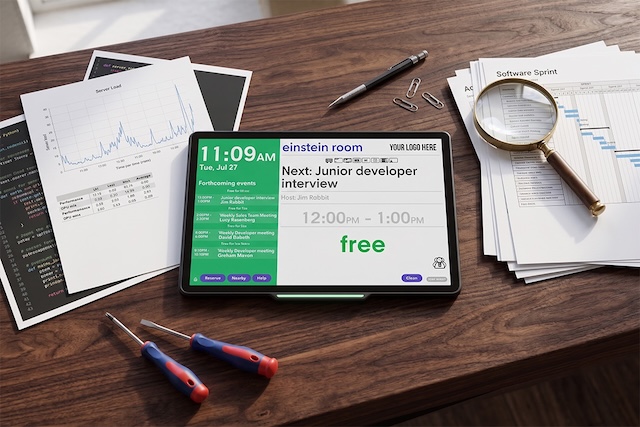
When you are ready to select a room booking solution, you need to know exactly how it will perform within your unique IT infrastructure and physical office space.
We offer the most comprehensive base for testing our Door Tablet products on the market. Whether you want to explore the software in a sandbox, run it on your own servers, or physically mount displays outside your meeting rooms, this guide breaks down every way your teams can evaluate Door Tablet before buying.
Key Takeaways
- Door Tablet offers a range of evaluation options for prospects interested in our room-booking solution.
- You can test the Door Tablet software on your own server to evaluate security, firewall rules and workflows.
- We offer an Interactive Demo Directory where you can discover the software interface.
What is Door Tablet?
Door Tablet is a complete workspace management solution that provides both scheduling software and physical touchscreen displays for your meeting spaces. The platform connects directly to your calendar, such as Microsoft 365 or Google Workspace, instantly updating the screen outside the room when someone books a meeting to stop double-bookings and interrupted conversations.
Our team enables organisations to thoroughly evaluate our scheduling software and physical displays before making a purchase. Prospects can test native integrations through live demos, temporary licenses, and 30-day hardware pilots.
Explore the different ways your team can evaluate our solution, from initial discovery through to hands-on testing for administrators and IT teams:
Level 1: Guided Exploration and Sandbox Testing
Personalised Live Demonstrations
We provide a tailored Zoom walkthrough focusing on your specific scheduling platform and architecture requirements. Register for a free demo.
Interactive Demo Directory
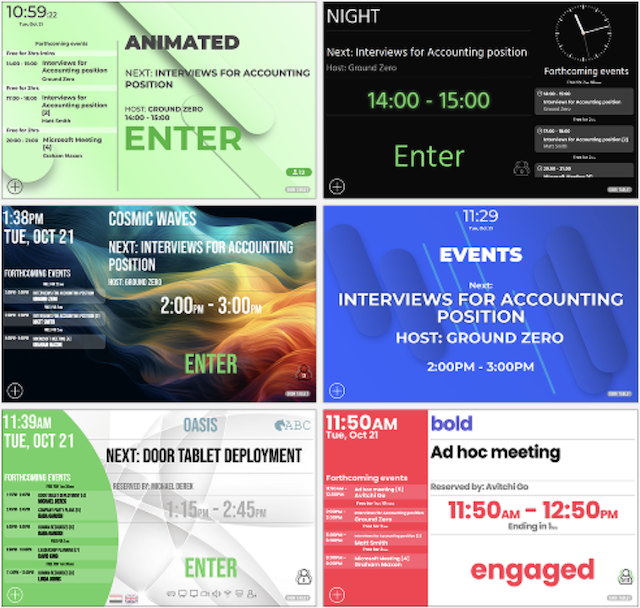
You can immediately click through the software and room display interfaces in our public demonstration environment. An account on our website is required to access the Demo Directory.
Considering a room scheduling solution for your office? Read this article to learn how to build the case and get your team on board.
Door Tablet School
We have a comprehensive library of training videos and technical guidance. These materials show exactly what setup and administration look like behind the scenes. You can access them whenever you need them.
Level 2: Software Evaluation on Your Own Infrastructure
Test on Your Own Network
IT teams can validate security, firewall rules, and workflows by connecting the software to your own server. First, create an account on our website, then learn how to test our software on your server.
Read more about Door Tablet’s deployment options
Temporary Evaluation Licenses
You can request a temporary license to test live integrations with our supported scheduling platforms, including Microsoft 365, Exchange, or Google Workspace using your own calendar data. This license removes the standard "evaluation software" pop-up that appears after one hour of unlicensed use.
Free Server for Small Deployments
The Door Tablet server is completely free for customer-hosted deployments of four rooms or fewer. Room licenses are still required. This provides the perfect bridge between a trial and a live rollout.
Level 3: Hardware Pilots and Proof of Concept (PoC)
30-Day Hardware Evaluation Programme
You can test the physical tablets in a real-world environment for 30 days and return them if you and your team choose not to proceed. Your facility teams should use this time to test physical mounting options, touch-interface responsiveness, and RFID/NFC badge check-ins.
Learn how to successfully roll out Door Tablet Room Scheduling Solution across your office.
Technical Workshops and Architecture Review
Most customers successfully set up their PoC using our included support, manuals, and video resources. However, if you'd like us to take care of the full setup, plan wider rollout strategies, and handle complex integrations, you can purchase dedicated, in-depth consulting hours as needed.
Ready to start your evaluation? Book a personalised live demonstration with our technical team today.
FAQs
How can I test Door Tablet on my own network?
IT teams can install the software on their own servers or use our temporary evaluation licenses to connect Door Tablet directly to their scheduling platform. Supported platforms include Microsoft 365, Exchange, Google Workspace, Building Engines Prism, LibCal, HCL Domino, GCC High and more.
Is there a free version of the Door Tablet server?
Yes, if you host the Door Tablet server yourself, the server software is free for deployments of 4 rooms or fewer. You only need to acquire the necessary room licenses.
Can we test the physical room displays before buying?
Yes, Door Tablet offers a 30-day hardware evaluation programme. You can deploy the physical tablets to test mounting options, RFID features, and occupancy sensors, with the option to return them if needed.